 Planfile
terraform fmt and terraform validate: format and check your code
terraform fmt rewrites your .tf files in Terraform's canonical style: two-space indentation, aligned equals signs, consistent spacing. terraform validate checks that the configuration is syntactically valid and internally consistent: argument names, types, required arguments and references. Neither touches infrastructure or state. Use terraform fmt -check -recursive and terraform validate in CI to catch problems before a plan.
What terraform fmt does
terraform fmt is Terraform's built-in formatter. It has no style options on purpose: every team's code ends up looking the same, and diffs show real changes instead of whitespace. By default it formats the configuration files in the current directory and prints the name of each file it changed.
Before:
resource "aws_s3_bucket" "logs" {
bucket = "acme-logs"
    force_destroy=true
  tags = {
  team = "platform"
      environment="prod"
  }
}
After terraform fmt:
resource "aws_s3_bucket" "logs" {
  bucket        = "acme-logs"
  force_destroy = true
  tags = {
    team        = "platform"
    environment = "prod"
  }
}
It fixes indentation (two spaces per level), lines up the = of consecutive arguments, and normalises spacing. It does not reorder arguments, rename anything or fix mistakes, and it stops with an error if a file isn't valid HCL syntax. HashiCorp may adjust the style slightly between versions, so run it again after upgrading Terraform.
terraform fmt options: -recursive, -check, -diff
| Command | What it does |
|---|---|
terraform fmt | Format files in the current directory and list the ones that changed. |
terraform fmt -recursive | Also format files in subdirectories, such as modules/. Without it, fmt only looks at the current folder. |
terraform fmt -check | Change nothing; exit non-zero and list the files that need formatting. |
terraform fmt -diff | Show the formatting changes as a diff. |
terraform fmt -write=false | Don't write files (implied by -check). Combine with -diff for a preview. |
terraform fmt -list=false | Don't print the names of changed files. |
terraform fmt main.tf | Format one file, or name a directory instead. |
terraform fmt - | Read from standard input and write the formatted result to standard output (for editor integrations). |
Preview what would change across a repository without touching anything:
terraform fmt -recursive -check -diffterraform fmt -check in CI and pre-commit hooks
In a pipeline you want to fail, not fix: a job that rewrites files nobody reviews is surprising. -check exits 0 when everything is formatted and non-zero otherwise, listing the offending files:
$ terraform fmt -check -recursive
modules/network/main.tf
Treat any non-zero exit as "run terraform fmt -recursive and commit". To catch it before pushing, add a Git hook in .git/hooks/pre-commit:
#!/bin/sh
terraform fmt -check -recursive || {
  echo "Run: terraform fmt -recursive"
  exit 1
}
Teams using the pre-commit framework often use the community pre-commit-terraform hooks, which include terraform_fmt and terraform_validate. Most editors with a Terraform extension can also run fmt on save.
What terraform validate checks
terraform validate reads every .tf file in the directory and checks that the configuration makes sense on its own:
- HCL syntax: braces, quotes, block structure.
- Argument and block names exist for that resource type (it uses the provider's schema).
- Required arguments are present.
- Values have the right type where it can tell (a string where a list is expected, for example).
- References point at things that exist:
var.regionis declared,aws_vpc.mainis defined, module outputs exist. - Rules such as
countandfor_eachnot both being set on one resource.
$ terraform validate
Success! The configuration is valid.
What terraform validate does not check
Validate works on the code alone. It doesn't validate remote services such as state or provider APIs, so it is fast and safe, and it doesn't need cloud credentials. That also means it can't catch:
| Not checked | Caught by |
|---|---|
| Whether credentials work or the region exists | terraform plan |
| Whether a bucket name is already taken, a quota is hit or an AMI exists | terraform apply (the provider API) |
| Drift between state and real infrastructure | terraform plan or plan -refresh-only |
| Formatting | terraform fmt -check |
| Many variable values (it checks the configuration for any value, not the ones you'll pass) | terraform plan with your -var-file |
| Policy and security rules | Policy tools such as Sentinel or OPA, or security scanners |
A passing validate means "this configuration could work", not "this plan will succeed".
terraform validate needs terraform init
Validation requires an initialised working directory with the referenced providers and modules installed, because argument names come from provider schemas. In a fresh clone you'll see an error asking you to run terraform init. In CI, where the job may not have state credentials, initialise without the backend:
terraform init -backend=false -input=false
terraform validate
For a pipeline or editor that needs structured results, terraform validate -json prints the diagnostics with file names, line numbers and severities; -no-color gives plain text for logs.
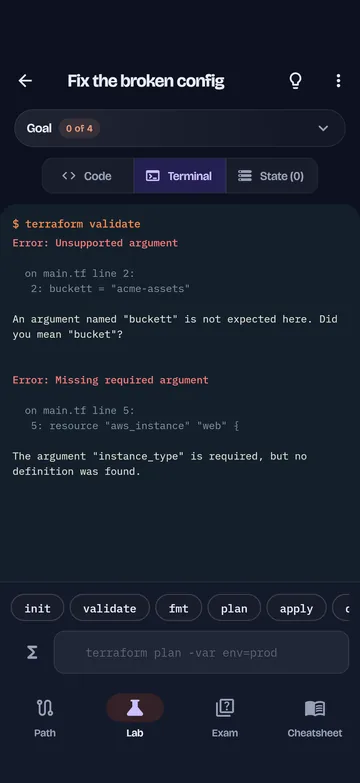
Example terraform validate errors
A typo in an argument name gets a suggestion:
│ Error: Unsupported argument
│
│   on main.tf line 2, in resource "aws_s3_bucket" "assets":
│    2:   buckett = "acme-assets"
│
│ An argument named "buckett" is not expected here. Did you mean "bucket"?
A missing required argument names the block:
│ Error: Missing required argument
│
│   on main.tf line 6, in resource "aws_subnet" "a":
│    6: resource "aws_subnet" "a" {
│
│ The argument "vpc_id" is required, but no definition was found.
A reference to something that isn't declared:
│ Error: Reference to undeclared input variable
│
│   on main.tf line 12, in resource "aws_s3_bucket" "logs":
│   12:   bucket = "acme-${var.env_name}-logs"
│
│ An input variable with the name "env_name" has not been declared. This
│ variable can be declared with a variable "env_name" {} block.
Each error gives the file, line and block, so fix them top to bottom and run validate again. One mistake can cause several errors further down; the first one is usually the real cause.
fmt, validate and plan: which check when
| Command | Checks | Needs init | Calls APIs | Changes files |
|---|---|---|---|---|
terraform fmt | Style | No | No | Yes (unless -check) |
terraform validate | Syntax, names, types, references | Yes | No | No |
terraform plan | Everything against real state | Yes | Yes | No |
Run them in that order: fmt is instant, validate takes seconds and needs no credentials, plan talks to your cloud. A common CI job:
terraform fmt -check -recursive
terraform init -backend=false -input=false
terraform validate
Formatting and validating are objectives 3g and 3c of the Terraform Associate exam. Expect questions on what validate does and doesn't check, and on fmt -check versus plain fmt. See the full Terraform commands cheat sheet and the certification guide.
Try it in a Lab
Planfile's Lab Fix the broken config hands you a messy configuration with two mistakes. Run terraform validate, fix the errors from the line numbers, run terraform fmt, then apply. It runs in a simulator on your iPhone, so no providers to download and no cloud account.
Questions
What does terraform fmt do?
It rewrites Terraform configuration files in the canonical style: two-space indentation, aligned equals signs and consistent spacing. It doesn't change what the code does.
How do I run terraform fmt recursively?
Use terraform fmt -recursive. Without it, fmt only formats files in the current directory, not in subdirectories such as modules/.
What does terraform fmt -check do?
It changes nothing and exits with a non-zero status if any file needs formatting, listing those files. Use it in CI and pre-commit hooks.
What does terraform validate check?
That the configuration is syntactically valid and internally consistent: argument names, required arguments, types and references. It makes no calls to provider APIs or remote state.
Does terraform validate need terraform init?
Yes. It needs the providers and modules installed to know their schemas. In CI, terraform init -backend=false is enough.
What is the difference between terraform validate and terraform plan?
validate checks the code on its own, offline. plan reads state, refreshes real infrastructure through the providers and works out the changes, so it catches problems validate can't.