 Planfile
Terraform labs: where and how to practise Terraform hands-on
You learn Terraform by running it. The cheapest Terraform labs need no cloud at all: the local, random and null providers and the built-in terraform_data resource teach the whole workflow on your laptop. For cloud practice, use LocalStack or a sandbox AWS account with a budget alert. Below are 10 practice exercises with commands, and the 26 Labs in Planfile, our iPhone app.
Ways to practise Terraform
| Option | Needs | Good for | Watch out for |
|---|---|---|---|
Local providers (local, random, null, terraform_data) | Terraform only | The workflow, state, variables, loops, modules, lifecycle | No real cloud resources or networking |
| LocalStack | Docker | AWS provider code without an AWS bill | Not every AWS service or behaviour is emulated |
| Sandbox cloud account | A cloud account, a card | Real resources, real errors, real IAM | Cost if you forget to destroy |
| HashiCorp tutorials | Terraform, sometimes Docker or a cloud account | Guided, official walkthroughs | You set up your own environment |
| Planfile Labs | An iPhone | Practising on the go, exam topics | A simulator, not the real binary |
Practise without a cloud: local providers
Several providers work entirely on your machine and need no credentials:
hashicorp/local:local_filewrites files, so you can see the result of an apply withcat.hashicorp/random:random_pet,random_id,random_integerandrandom_passwordgenerate values once and keep them in state.hashicorp/null:null_resource, a resource that does nothing. Since Terraform 1.4 the built-interraform_dataresource does the same job without a provider.
With these you can practise almost everything the Terraform Associate exam covers that isn't cloud-specific: init and the lock file, plans and replacements, state commands, drift, variables and outputs, count and for_each, modules, moved blocks, lifecycle rules, functions and terraform test. They are also free and instant, so you can destroy and rebuild a hundred times.
A Terraform playground for AWS: LocalStack
LocalStack runs an emulation of many AWS APIs in a Docker container on your machine. You point the AWS provider at it and use the same resource types as on real AWS:
provider "aws" {
  region                      = "us-east-1"
  access_key                  = "test" # dummy values LocalStack accepts
  secret_key                  = "test"
  skip_credentials_validation = true
  skip_requesting_account_id  = true
  s3_use_path_style           = true

  endpoints {
    s3       = "http://localhost:4566"
    dynamodb = "http://localhost:4566"
  }
}
LocalStack also publishes tflocal, a wrapper that sets the endpoints for you. Check LocalStack's current plans before you start: which services are emulated, and how faithfully, depends on the edition, and emulators never match AWS exactly, especially for IAM and networking.
Practise on a real cloud, safely
Real resources teach things no emulator does: eventual consistency, quota errors, IAM denials, the time a NAT gateway takes. Keep it safe and cheap:
- Use a separate sandbox account (an AWS Organizations member account, an Azure subscription or a GCP project), never production.
- Create a budget alert before anything else (AWS Budgets, Azure Cost Management or Google Cloud budgets).
- Prefer resources that cost nothing idle: S3 buckets, VPCs, subnets, security groups, IAM roles, DynamoDB tables in on-demand mode. Be careful with NAT gateways, load balancers and databases, which bill by the hour.
- Tag everything (the AWS provider's
default_tagshelps) and finish every session withterraform destroy. - Use short-lived credentials (SSO or roles), not long-lived access keys.
The Terraform tutorial is a safe first exercise on AWS: one empty bucket, created and destroyed.
HashiCorp's own tutorials
HashiCorp publishes free, step-by-step tutorials at developer.hashicorp.com/terraform/tutorials. The Get Started collections cover AWS, Azure, Google Cloud and Docker; the Docker one runs a container on your own machine, which makes it another no-cloud option. There are also collections for modules, state, HCP Terraform and certification prep. They are the authoritative source and worth doing alongside the exercises below.
10 Terraform practice exercises
Each exercise runs on your laptop with only Terraform installed (no cloud). Work in a fresh folder, run terraform init after adding a provider or module, and end each one with terraform destroy.
1. A first apply with no cloud
Goal: run the full workflow on a resource that only writes a file.
# main.tf
resource "local_file" "hello" {
  filename = "${path.module}/hello.txt"
  content  = "Hello, Terraform"
}

$ terraform init
$ terraform plan
$ terraform apply
$ cat hello.txt
$ terraform plan     # expect: No changes.
Done when the second plan reports No changes.
2. Update or replace?
Goal: see which changes Terraform can make in place.
# change content to "Hello again", then:
$ terraform plan
local_file can't edit a file in place, so the plan shows -/+ with # forces replacement on content. Compare with a tag change on a cloud resource, which shows ~. Background: terraform plan.
3. Random names and keepers
Goal: use the random provider, an output, and a forced replacement.
resource "random_pet" "name" {
  keepers = {
    release = "1"
  }
}

output "name" {
  value = random_pet.name.id
}

$ terraform init       # installs hashicorp/random
$ terraform apply
$ terraform output name
# change release to "2" and plan: the pet is replaced
Then try terraform apply -replace=random_pet.name to force a new value without editing anything (-replace and taint).
4. Variables and tfvars
Goal: drive one configuration with different inputs.
variable "env" {
  type    = string
  default = "dev"
}

resource "local_file" "config" {
  filename = "${path.module}/${var.env}.conf"
  content  = "env=${var.env}\n"
}

$ terraform plan -var env=prod
$ echo 'env = "staging"' > staging.tfvars
$ terraform plan -var-file=staging.tfvars
$ TF_VAR_env=test terraform plan
Add a validation block that only allows dev, staging and prod, and watch the plan fail for anything else. See variables and outputs.
5. count and for_each
Goal: create several resources from one block, then remove one safely.
variable "teams" {
  type    = set(string)
  default = ["web", "data", "ops"]
}

resource "local_file" "team" {
  for_each = var.teams
  filename = "${path.module}/${each.key}.txt"
  content  = "team ${each.key}"
}

$ terraform apply
$ terraform state list
# remove "data" from the default and plan: only local_file.team["data"] is destroyed
Then rewrite it with count and a list, remove the middle item, and compare the plans. That difference is why for_each is usually the safer choice (for_each vs count).
6. Drift: a change made outside Terraform
Goal: see how refresh notices outside changes.
$ terraform apply
$ rm hello.txt          # someone deletes it by hand
$ terraform plan        # Terraform plans to create it again
With a cloud resource you would change a tag in the console instead. Learn the two responses, fix it with apply or accept it with terraform apply -refresh-only, in Terraform drift.
7. Rename without destroying
Goal: change a resource's address without recreating it.
# rename local_file.hello to local_file.greeting, plan: destroy + create
# then add:
moved {
  from = local_file.hello
  to   = local_file.greeting
}

$ terraform plan        # the resource is moved, nothing is replaced
See the moved block and terraform state mv.
8. Protect a resource
Goal: make Terraform refuse to destroy something.
resource "terraform_data" "orders_table" {
  input = "orders"

  lifecycle {
    prevent_destroy = true
  }
}

$ terraform apply
$ terraform destroy
Error: Instance cannot be destroyed
terraform_data is built into Terraform (1.4+), so it needs no provider and replaces most uses of null_resource. Then try create_before_destroy and ignore_changes from lifecycle rules.
9. Functions in the console
Goal: work out expressions before putting them in code.
$ terraform console
> cidrsubnet("10.0.0.0/16", 8, 3)
"10.0.3.0/24"
> upper("prod")
"PROD"
> merge({a = 1}, {b = 2})
{
  "a" = 1
  "b" = 2
}
Type exit to leave. See Terraform functions.
10. Write a module
Goal: turn exercise 5 into a reusable local module.
# modules/team_file/main.tf: variable "team", local_file "this", output "path"
module "web" {
  source = "./modules/team_file"
  team   = "web"
}

$ terraform init        # installs the local module
$ terraform apply
$ terraform state list  # module.web.local_file.this
See Terraform modules.
Planfile: a Terraform app for iPhone
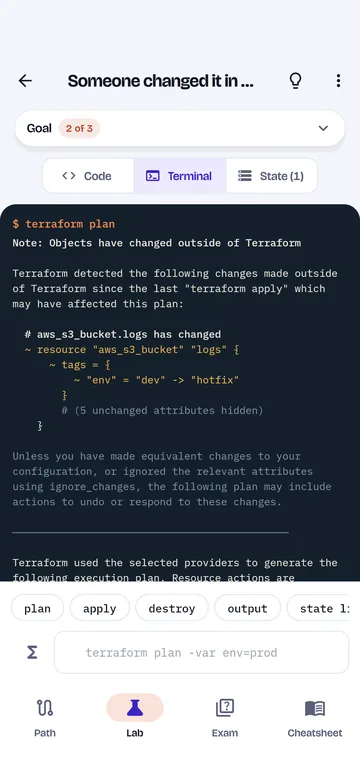
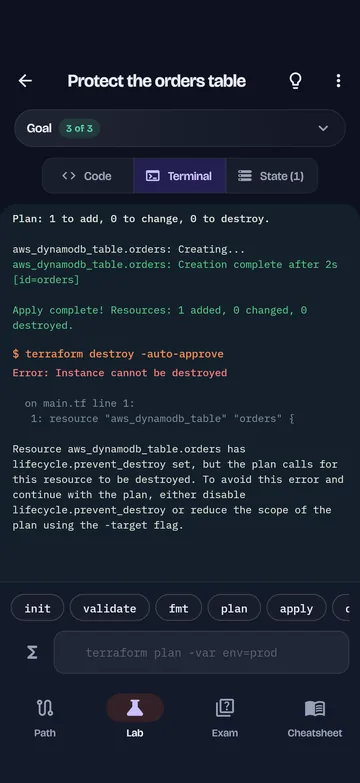
Planfile is our iPhone app for learning Terraform and preparing for the Terraform Associate exam. Its Labs are the hands-on part: a code editor and a terminal on your phone. The Lab is a simulator written for the app, not the real Terraform binary. It understands HCL and the CLI: init, validate, fmt, plan (with -var, -var-file, -destroy, -replace, -out, -refresh-only), apply, destroy, output, show, the state commands, workspace and console. It has fake aws, random, local and null providers plus terraform_data, and some Labs simulate drift: changes made outside Terraform.
What it isn't: it doesn't run real Terraform, connect to AWS, Azure or GCP, use registry modules or HCP Terraform, and it is iPhone only (iPad runs it in iPhone mode). Because there is no real cloud, there are no credentials and no bill, and it works offline. Treat it as practice for the workflow and the exam, then use the options above for real infrastructure.
Chapters 1 and 2 are free. A one-time purchase ($14.99 in the US) unlocks all 8 chapters, 42 lessons, 26 Labs and 74 practice questions, with Family Sharing.
Planfile's 26 Terraform Labs
Each Lab opens a small Terraform project with a goal and checks; you edit the files, run commands in a terminal, and the checks tick off as you go. Here are all 26, by chapter:
Chapter 1: How Terraform works (free)
- Your first apply: init, plan, apply one S3 bucket, then a plan with no changes
- Update or replace?: a tag change updates in place, a rename forces replacement
Chapter 2: Providers and resources (free)
- Connect a subnet to its VPC: references and an output
- Fix the broken config: terraform validate and terraform fmt
- Tear it down: plan -destroy, then destroy in dependency order
Chapter 3: Variables, locals and outputs
- One config, two environments: a variable and plan -var env=prod
- Locals and outputs: a local prefix and terraform output
Chapter 4: State and backends
- Explore the state: state list and state show
- Someone changed it in the console: spot drift and put it back
- Keep the change instead: apply -refresh-only, then update the code
- Rename without destroying: a moved block
Chapter 5: Modules
- Use the bucket module: call a local module and init
- Wire two modules together: pass one module's output to another
- Write your own module: variable, resource and output
Chapter 6: Loops and conditionals
- Three web servers: count and
count.index, with a splat output - One bucket per team: for_each, and removing one key
- An optional bucket: a conditional with count
- Rules from a list: a dynamic ingress block
Chapter 7: Lifecycle and dependencies
- Replace without a gap: create_before_destroy
- Protect the orders table: prevent_destroy
- Let the tagging policy be: ignore_changes
- Replace on each release: replace_triggered_by with terraform_data
- Guard the instance type: a precondition
Chapter 8: Functions and expressions
- Work it out in the console: cidrsubnet
- Default tags with merge: merge() and locals
- Carve the subnets: cidrsubnet with
count.index
Questions
Is there a free Terraform playground?
Terraform itself is free, and the local, random and null providers let you practise on your own machine with no cloud account. LocalStack emulates many AWS APIs locally, and HashiCorp's tutorials are free.
How can I practise Terraform without AWS?
Use providers that need no credentials, such as local_file, random_pet and the built-in terraform_data resource, or the Docker provider from HashiCorp's Get Started tutorial. They cover the workflow, state, variables, loops, modules and lifecycle rules.
Is there a Terraform app for iPhone?
Planfile is an iPhone app with lessons, 26 hands-on Labs that simulate the Terraform CLI and HCL, and 74 practice questions for the Terraform Associate exam. It does not run real Terraform or connect to a cloud.
What are good Terraform practice exercises for beginners?
Start with a first apply of a local_file, then see update versus replace, add variables and outputs, use for_each, cause drift, rename with a moved block, protect a resource with prevent_destroy and write a small module.
Will practising Terraform on AWS cost money?
It can. Stick to resources that are free when idle, such as S3 buckets, VPCs and IAM roles, set a budget alert, and run terraform destroy at the end of every session.