 Planfile
terraform plan: what it does and how to read the output
terraform plan compares your configuration with the current state (refreshed from the real infrastructure) and prints the changes Terraform would make, without making them. Each resource gets a symbol: + create, ~ update in place, - destroy, and -/+ replace. The summary line counts them: Plan: 1 to add, 0 to change, 1 to destroy. Save a plan with -out to apply exactly that plan later.
What terraform plan does
A plan is Terraform's proposal. When you run terraform plan in an initialised directory, Terraform:
- Reads the current state (from the local
terraform.tfstateor the configured backend). - Refreshes it: asks each provider for the latest values of the objects it manages, so changes made outside Terraform show up.
- Compares the refreshed state with your configuration and works out the actions needed to make them match.
- Prints those actions. Nothing is created, changed or deleted.
Because it changes nothing, terraform plan is safe to run at any time. It is also what terraform apply runs first: apply shows the same plan and waits for you to type yes.
$ terraform plan

Terraform used the selected providers to generate the following execution
plan. Resource actions are indicated with the following symbols:
  + create

Terraform will perform the following actions:

  # aws_s3_bucket.logs will be created
  + resource "aws_s3_bucket" "logs" {
      + arn           = (known after apply)
      + bucket        = "planfile-logs"
      + force_destroy = false
      + id            = (known after apply)
      + region        = (known after apply)
    }

Plan: 1 to add, 0 to change, 0 to destroy.
The plan symbols
Every resource in the plan starts with a symbol, and so does every attribute inside it.
| Symbol | Meaning | Typical cause |
|---|---|---|
+ | create | A new resource block, or a new key in for_each |
~ | update in place | An argument the provider can change on the live object, such as tags |
- | destroy | A resource block removed from the configuration, or terraform plan -destroy |
-/+ | destroy, then create a replacement | An argument that can't be changed in place (marked # forces replacement) |
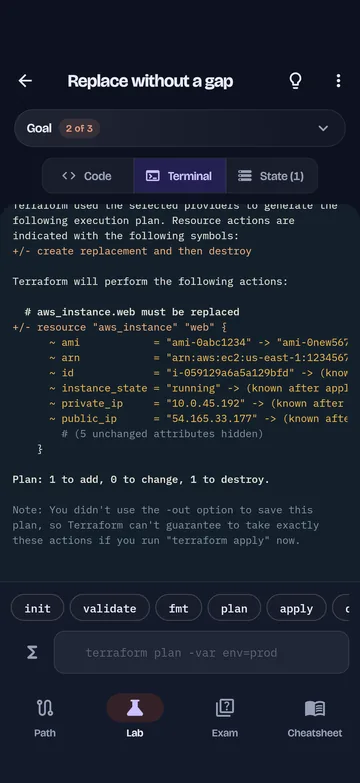
+/- | create the replacement, then destroy the old one | The same, with lifecycle { create_before_destroy = true } |
<= | read | A data source that can only be read during apply |
Inside a resource, ~ marks a changed attribute and shows old -> new. (known after apply) means the provider only knows the value once the object exists, like an ID or ARN. Values hidden as (sensitive value) come from sensitive variables or outputs.
Update in place or replace?
This is the most important thing a plan tells you. Some arguments can be changed on a live object; others can't, and changing them means Terraform destroys the object and creates a new one. For an S3 bucket, tags update in place, but the bucket name can't change:
  # aws_s3_bucket.logs must be replaced
-/+ resource "aws_s3_bucket" "logs" {
      ~ arn    = "arn:aws:s3:::planfile-logs" -> (known after apply)
      ~ bucket = "planfile-logs" -> "planfile-logs-v2" # forces replacement
      ~ id     = "planfile-logs" -> (known after apply)
      ~ tags   = {
          ~ "env" = "dev" -> "prod"
        }
        # (1 unchanged attribute hidden)
    }

Plan: 1 to add, 0 to change, 1 to destroy.
The # forces replacement comment names the argument responsible. Whether an argument forces replacement is decided by the provider, so check the resource's documentation in the Terraform Registry. A replacement on a database or a bucket with data in it is where plans earn their keep: read the line before you apply.
To avoid downtime when a replacement is unavoidable, set create_before_destroy (the plan then shows +/-). To stop a critical resource being destroyed at all, use prevent_destroy. Both are covered in Terraform lifecycle rules.
Changes made outside Terraform
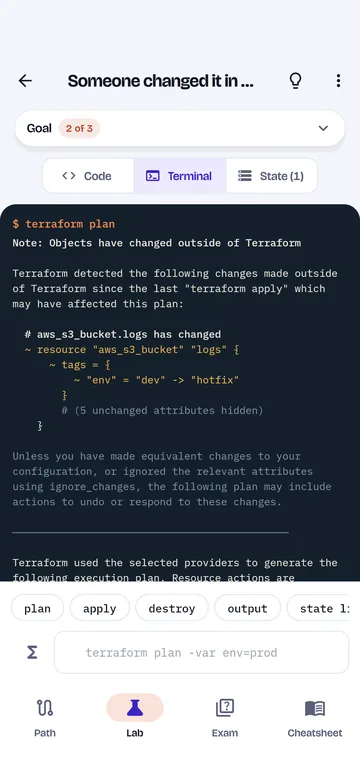
If someone changed a managed object in the console, the refresh step notices, and the plan starts with a separate section:
Note: Objects have changed outside of Terraform

Terraform detected the following changes made outside of Terraform since the
last "terraform apply" which may have affected this plan:

  # aws_s3_bucket.logs has changed
  ~ resource "aws_s3_bucket" "logs" {
      ~ tags = {
          + "owner" = "ops"
        }
    }
The actions that follow will put the object back to match your configuration. If the outside change should stay, update the configuration, or accept the real values into state with terraform apply -refresh-only. See Terraform drift.
Save a plan with -out and apply it
By default a plan is only shown. Terraform reminds you:
Note: You didn't use the -out option to save this plan, so Terraform can't
guarantee to take exactly these actions if you run "terraform apply" now.
To apply exactly what you reviewed, save it to a file and apply the file:
terraform plan -out=tfplan
terraform apply tfplan
Applying a saved plan doesn't ask for approval: you approved it by saving it. If the state changed since the plan was made, Terraform refuses with Saved plan is stale and you plan again. The plan file is binary; read it with terraform show tfplan, or terraform show -json tfplan for tools and policy checks. Plan files can contain sensitive values, so don't commit them.
Useful terraform plan options
| Option | What it does |
|---|---|
-out=FILE | Save the plan to apply later with terraform apply FILE |
-var 'name=value', -var-file=prod.tfvars | Set input variables for this plan |
-destroy | Plan to destroy everything in state (what terraform destroy shows) |
-replace=ADDRESS | Plan to replace one resource even though nothing changed |
-refresh-only | Only update state to match the real objects; no changes to infrastructure |
-refresh=false | Skip the refresh (faster, but blind to outside changes) |
-target=ADDRESS | Plan only that resource and what it depends on. For exceptions, not routine use |
-detailed-exitcode | Exit 0 with no changes, 1 on error, 2 when there are changes: handy in CI |
-no-color | Plain output for logs |
When nothing needs to change, the plan says so: No changes. Your infrastructure matches the configuration. That is the result you want after every apply.
Common terraform plan errors
- Inconsistent dependency lock file or provider not installed: run
terraform init(with-upgradeif you changed a version constraint). - Backend initialization required: the backend block changed. Run
terraform init(-reconfigureor-migrate-stateas appropriate). - No value for required variable: pass it with
-var, a.tfvarsfile or aTF_VAR_nameenvironment variable. - Error acquiring the state lock: someone else is running Terraform on the same state. Wait; use
terraform force-unlock LOCK_IDonly if the lock is stale. - Reference to undeclared resource: a typo in an address.
terraform validatecatches these before any API calls.
Try it in a Lab
Planfile's Lab Update or replace? is this page as an exercise: change a tag and see ~, rename the bucket and see -/+ with # forces replacement, then apply and check the new state. The Lab runs on a simulated cloud on your iPhone, so nothing real is touched.
Questions
Does terraform plan change anything?
No. terraform plan only reads state and the real infrastructure and prints proposed changes. Nothing is created, updated or deleted until you run terraform apply.
What does -/+ mean in a Terraform plan?
The resource will be destroyed and then created again because an argument that can't be updated in place changed. The argument is marked # forces replacement.
What does (known after apply) mean?
The value is set by the provider when the object is created or replaced, such as an ID or ARN, so Terraform can't show it during plan.
How do I save terraform plan output to a file?
Use terraform plan -out=tfplan to save the binary plan, then terraform apply tfplan. For readable text, run terraform show tfplan, or redirect the output with terraform plan -no-color > plan.txt.
Is terraform plan the same as a dry run?
Yes, effectively. It is Terraform's dry run: it shows what apply would do without doing it.
What is the difference between terraform plan and terraform apply?
plan only proposes changes; apply makes a plan (or uses a saved one) and then performs the changes after you approve them.