 Planfile
Terraform commands: the complete cheat sheet
The Terraform commands you use every day are terraform init (prepare the folder), terraform validate and terraform fmt (check and tidy), terraform plan (preview changes), terraform apply (make them) and terraform destroy (remove everything). Around them sit commands to inspect and change state, manage workspaces and debug. Below is the full list for Terraform 1.12 and later, with one-line meanings and examples.
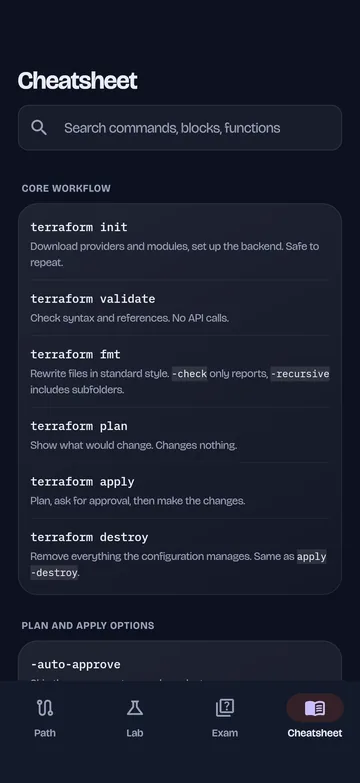
Core Terraform commands: the basic workflow
These six commands cover the core workflow: write, check, preview, apply. Run them in the directory that holds your .tf files (the root module).
| Command | What it does | Example |
|---|---|---|
terraform init | Prepare the working directory: configure the backend, install providers and modules, write .terraform.lock.hcl. Safe to repeat. | terraform init -upgrade |
terraform validate | Check syntax, argument names, types and references. No API calls; needs init first. | terraform validate |
terraform fmt | Rewrite .tf files in the canonical style. | terraform fmt -recursive |
terraform plan | Refresh state, compare with the configuration and show the changes. Changes nothing. | terraform plan -out=tfplan |
terraform apply | Make the changes: plans and asks for yes, or applies a saved plan without asking. | terraform apply tfplan |
terraform destroy | Destroy everything in state, after approval. Same as terraform apply -destroy. | terraform destroy |
A typical first run:
terraform init
terraform fmt
terraform validate
terraform plan -out=tfplan
terraform apply tfplan
Each step is explained in its own guide: terraform init, terraform fmt and validate, terraform plan and terraform apply and destroy.
Plan and apply options
Most of the day-to-day control is in the flags. Options go after the command name.
| Option | Works with | What it does |
|---|---|---|
-out=FILE | plan | Save the plan; terraform apply FILE applies exactly that plan. |
-var 'NAME=VALUE' | plan, apply, destroy | Set one input variable. Command-line values win over files and TF_VAR_ variables. |
-var-file=FILE | plan, apply, destroy | Load variable values from a .tfvars file. |
-auto-approve | apply, destroy | Skip the yes prompt. |
-replace=ADDRESS | plan, apply | Replace one resource instance even though nothing changed. Use instead of taint. |
-target=ADDRESS | plan, apply, destroy | Limit the run to one resource and its dependencies. For exceptions, not routine use. |
-destroy | plan, apply | Plan the destruction of everything in state. |
-refresh-only | plan, apply | Update state to match the real objects; no infrastructure changes. Use instead of refresh. |
-refresh=false | plan, apply | Skip the refresh step. Faster, but blind to drift. |
-detailed-exitcode | plan | Exit 0 for no changes, 1 for an error, 2 when there are changes. |
-generate-config-out=FILE | plan | Write HCL for resources in import blocks that have no configuration yet (1.5+). |
-input=false | most commands | Never prompt; fail if a value is missing. Use in CI. |
-lock-timeout=60s | commands that lock state | Wait for a state lock instead of failing at once. |
-parallelism=N | plan, apply, destroy | Limit concurrent operations (default 10). |
-no-color | most commands | Plain output for logs and files. |
-json | plan, apply, validate, init and others | Machine-readable output. |
Two patterns worth remembering:
# Review exactly what will be applied (CI, or any change that matters)
terraform plan -out=tfplan -var-file=prod.tfvars
terraform apply tfplan

# Recreate one resource without editing code
terraform apply -replace='aws_instance.web[0]'
Quote addresses that contain brackets or quotes so the shell leaves them alone, for example -target='aws_s3_bucket.team["web"]'.
Commands to inspect state and outputs
These read state and change nothing. They are how you answer "what does Terraform think exists?"
| Command | What it does | Example |
|---|---|---|
terraform state list | Every resource address in state. Filter with an address prefix. | terraform state list module.network |
terraform state show ADDRESS | All attributes of one resource instance. | terraform state show aws_subnet.a |
terraform show | The whole state in readable form, or a saved plan. | terraform show tfplan |
terraform show -json | State or a saved plan as JSON, for scripts and policy tools. | terraform show -json tfplan > plan.json |
terraform output | All root module outputs. Sensitive ones show as <sensitive>. | terraform output |
terraform output -raw NAME | One output as a plain string, for shell scripts. | terraform output -raw bucket_name |
terraform output -json | Outputs as JSON, including sensitive values. | terraform output -json |
terraform state pull | Print the raw state from the backend. Handy for a backup. | terraform state pull > backup.tfstate |
terraform state list and terraform state show are the ones the Terraform Associate exam expects you to know (objective 7b). More in the Terraform state guide.
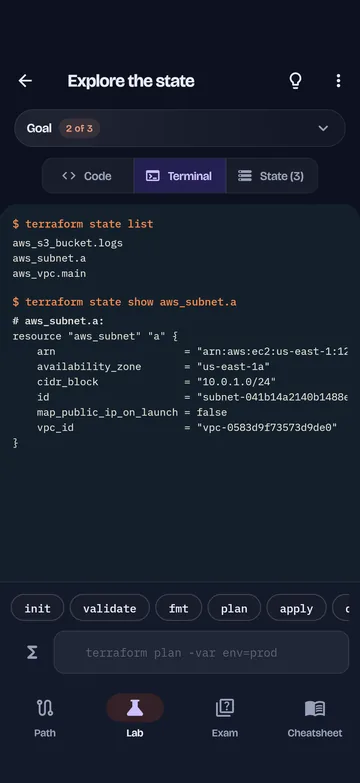
Commands that change state
These edit state directly or force changes. Take a backup with terraform state pull first, and prefer the config-driven blocks where they exist, because they go through a normal plan that someone can review.
| Command | What it does | Example |
|---|---|---|
terraform state mv FROM TO | Change an object's address without recreating it. A moved block does the same in code review. | terraform state mv aws_instance.web aws_instance.app |
terraform state rm ADDRESS | Forget an object. It keeps running; Terraform stops managing it. | terraform state rm aws_s3_bucket.old |
terraform import ADDRESS ID | Bring an existing object into state for a resource block you wrote. import blocks (1.5+) do this through plan and apply. | terraform import aws_s3_bucket.logs acme-logs |
terraform state replace-provider FROM TO | Point resources at a different provider source address. | terraform state replace-provider hashicorp/aws registry.example.com/acme/aws |
terraform state push FILE | Overwrite the remote state with a local file. Dangerous; last resort. | terraform state push backup.tfstate |
terraform force-unlock LOCK_ID | Release a stuck state lock left by a crashed run. Only when nothing else is running. | terraform force-unlock 6a1b2c3d-… |
terraform taint ADDRESS | Deprecated. Marks an instance for replacement on the next apply. Use terraform apply -replace=ADDRESS. | terraform apply -replace=aws_instance.web |
terraform untaint ADDRESS | Remove the tainted mark, for example from an instance whose create failed part way, so it isn't replaced. | terraform untaint aws_instance.web |
terraform refresh | Deprecated. Updates state from real objects without review. Use -refresh-only. | terraform apply -refresh-only |
The block-based alternatives:
| Block (in .tf files) | Replaces | Since |
|---|---|---|
moved { from = A to = B } | terraform state mv | 1.1 |
import { to = ADDRESS id = "ID" } | terraform import | 1.5 |
removed { from = A lifecycle { destroy = false } } | terraform state rm | 1.7 |
See the moved block, terraform import and taint vs -replace.
Workspace commands
CLI workspaces keep several states for one configuration, for example default and staging. Read the current name in HCL as terraform.workspace.
| Command | What it does | Example |
|---|---|---|
terraform workspace list | List workspaces; * marks the current one. | terraform workspace list |
terraform workspace show | Print the current workspace name. | terraform workspace show |
terraform workspace new NAME | Create a workspace (an empty state) and switch to it. | terraform workspace new staging |
terraform workspace select NAME | Switch workspace. -or-create creates it if missing. | terraform workspace select -or-create staging |
terraform workspace delete NAME | Delete a workspace. Refuses if its state still tracks resources unless you add -force. | terraform workspace delete staging |
HCP Terraform also has workspaces, but they are a different thing: each one is a separate configuration run with its own variables and permissions. See Terraform workspaces.
Other Terraform CLI commands
| Command | What it does | Example |
|---|---|---|
terraform console | Evaluate expressions and functions against your configuration and state. | terraform console |
terraform graph | Print the dependency graph in DOT format for Graphviz. | terraform graph | dot -Tsvg > graph.svg |
terraform providers | Show which providers the configuration and its modules require. | terraform providers |
terraform providers lock | Add checksums for more platforms to the lock file. | terraform providers lock -platform=linux_amd64 -platform=darwin_arm64 |
terraform providers mirror DIR | Download the required providers into a directory for offline use. | terraform providers mirror ./mirror |
terraform providers schema -json | Print the schemas of the providers in use. | terraform providers schema -json |
terraform version | Terraform and provider versions; warns when a newer Terraform exists. | terraform version -json |
terraform get | Install or update modules only (init also does this). | terraform get -update |
terraform login [HOST] | Get an API token for HCP Terraform (default app.terraform.io) or another host and save it locally. | terraform login |
terraform logout [HOST] | Remove the saved token for that host. | terraform logout |
terraform test | Run the .tftest.hcl test files in the directory and in tests/ (1.6+). | terraform test |
terraform -chdir=DIR CMD | Run any command as if inside another directory. | terraform -chdir=envs/prod plan |
terraform -help | List commands; terraform CMD -help lists a command's options. | terraform plan -help |
Try terraform console whenever a function or expression puzzles you:
$ terraform console
> cidrsubnet("10.0.0.0/16", 8, 3)
"10.0.3.0/24"
> upper("prod")
"PROD"
> exit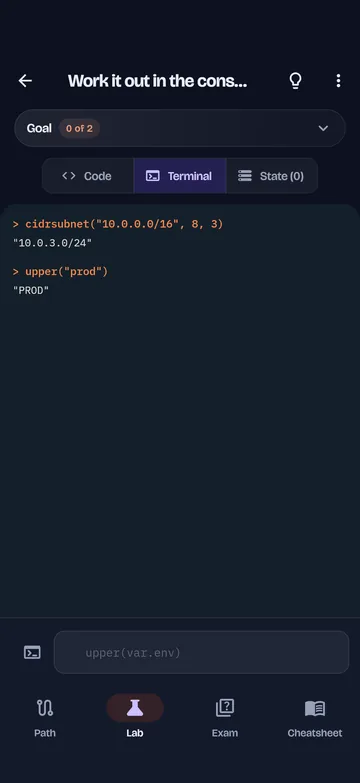
Verbose logging with TF_LOG
When a command fails in a way the error doesn't explain, turn on Terraform's logs with the TF_LOG environment variable. Levels, from most to least detail: TRACE, DEBUG, INFO, WARN, ERROR. TF_LOG=JSON gives TRACE output as JSON. Logs go to standard error unless you set TF_LOG_PATH, which writes them to a file (it only works when TF_LOG is set).
TF_LOG=DEBUG TF_LOG_PATH=./terraform.log terraform plan

# only the provider's logs, or only Terraform core's
TF_LOG_PROVIDER=TRACE terraform apply
TF_LOG_CORE=TRACE terraform plan
Trace logs are long and can contain sensitive values, so don't paste them into public issues without reading them first. Unset the variable when you're done: unset TF_LOG. Knowing when and how to use verbose logging is Terraform Associate objective 7c.
Environment variables worth knowing
| Variable | What it does |
|---|---|
TF_VAR_name | Sets input variable name: export TF_VAR_region=eu-west-1. |
TF_LOG | Log level: TRACE, DEBUG, INFO, WARN, ERROR or JSON. |
TF_LOG_PATH | File to write logs to. |
TF_INPUT | Set to false or 0 to disable prompts, like -input=false. |
TF_CLI_ARGS_plan | Extra arguments added to every terraform plan; TF_CLI_ARGS applies to all commands. |
TF_IN_AUTOMATION | Any non-empty value trims output that suggests next commands to a human; for CI. |
TF_WORKSPACE | Selects the workspace without running workspace select. |
TF_DATA_DIR | Moves the .terraform directory somewhere else. |
Exit codes for scripts and CI
Terraform exits 0 on success and 1 on error. Two commands add a meaning you can script against:
terraform plan -detailed-exitcode:0no changes,1error,2changes present. Useful for scheduled drift checks.terraform fmt -check: non-zero when any file would be reformatted, and it lists those files.
terraform plan -detailed-exitcode -input=false -no-color
case $? in
  0) echo "no changes" ;;
  2) echo "changes or drift found" ;;
  *) echo "plan failed"; exit 1 ;;
esac
Practise the commands in a Lab
Planfile's Labs give you a simulated terminal on your iPhone with init, validate, fmt, plan (with -var, -out, -replace, -destroy, -refresh-only), apply, destroy, output, show, state list/show/rm/mv, workspace and console, against a fake cloud. The same cheat sheet is in the app, offline.
Questions
What are the basic Terraform commands?
terraform init, terraform validate, terraform fmt, terraform plan, terraform apply and terraform destroy. Together they make up the core workflow: prepare the folder, check the code, preview the changes, apply them and clean up.
What is the difference between terraform plan and terraform apply?
plan only shows the changes Terraform would make. apply makes them, after you approve the plan or when you pass it a saved plan file.
Is terraform refresh deprecated?
Yes. Use terraform plan -refresh-only to review what changed outside Terraform and terraform apply -refresh-only to write it to state. terraform refresh does the same as apply -refresh-only -auto-approve, with no review.
What replaced terraform taint?
terraform apply -replace=ADDRESS (or plan -replace). It shows the replacement in the plan instead of silently marking state, and it is the approach HashiCorp recommends since Terraform 0.15.2.
How do I see Terraform debug logs?
Set TF_LOG to TRACE, DEBUG, INFO, WARN or ERROR before the command, for example TF_LOG=DEBUG terraform plan. Add TF_LOG_PATH=terraform.log to write the logs to a file.
How do I list all resources Terraform manages?
Run terraform state list. It prints every resource address in the current workspace's state; terraform state show ADDRESS prints one in detail.