 Planfile
Terraform certification: the HashiCorp Terraform Associate (004) guide
The main Terraform certification is the HashiCorp Certified: Terraform Associate (004). It is a one-hour, multiple-choice exam taken online with a remote proctor, tests Terraform 1.12, and costs $70.50 USD plus local taxes and fees. The credential is valid for two years. It covers eight domains, from infrastructure as code and the core workflow to state, modules and HCP Terraform. This page lists every objective with what to study.
What is the Terraform Associate certification?
HashiCorp Certified: Terraform Associate is HashiCorp's entry-level Terraform certification. It shows that you understand the concepts and the day-to-day work: writing configuration, running the core workflow, managing state, using modules and knowing what HCP Terraform adds. The current version is 004; it replaced the Terraform Associate 003 exam.
It suits:
- Cloud, DevOps and platform engineers who use Terraform, or will soon.
- Developers who touch infrastructure code and want the concepts straight.
- Anyone who wants a recognised, relatively cheap credential to show Terraform knowledge.
HashiCorp's stated prerequisites are basic terminal skills and an understanding of on-premises and cloud architecture. You don't need to be an expert, but you should have run Terraform yourself: many questions describe a situation and ask what Terraform would do. HashiCorp also offers a separate professional-level Terraform exam for experienced practitioners; the Associate is the place to start.
Terraform Associate 004 exam facts
| Terraform Associate (004) | |
|---|---|
| Format | Multiple choice |
| Delivery | Online, proctored |
| Duration | 1 hour |
| Language | English |
| Terraform version tested | 1.12 |
| Price | $70.50 USD plus locally applicable taxes and fees |
| Retake | Free retake not included |
| Valid for | 2 years |
| Prerequisites | Basic terminal skills; understanding of on-premises and cloud architecture |
HashiCorp does not publish the number of questions or a passing score for 004, so be wary of any site that quotes them as fact. HashiCorp's official sample questions show the question styles. The official facts are on the Terraform Associate certification page (checked 26 November 2026).
Terraform certification cost and renewal
The Terraform Associate 004 exam costs $70.50 USD, plus whatever taxes and fees apply where you live. A free retake is not included, so if you fail you pay again for the next attempt.
The credential is valid for two years. To renew, you can retake the current Associate exam starting six months before your credential expires. If you hold the older Terraform Associate 002 or 003, you can take 004 from six months before your expiry date. HashiCorp's certification page lists the exact renewal rules for each version, including other ways to extend a credential.
Terraform Associate 003 vs 004: what changed
If you studied for 003, most of it still applies. The 004 exam:
- Tests Terraform 1.12, so recent features are fair game:
importblocks,movedandremovedblocks,checkblocks,-replaceand-refresh-onlyinstead oftaintandrefresh. - Adds four objectives: 4f define resource dependencies, 4g validate configuration using custom conditions, 4h manage sensitive data including secrets management with Vault, and 8c organise and use HCP Terraform workspaces and projects.
- Includes HCP Terraform content throughout domain 8 (HCP Terraform is the new name for Terraform Cloud).
Old 003 practice material can still help with the fundamentals, but check anything about deprecated commands, and add study time for the new objectives.
Terraform Associate 004 exam objectives
These are HashiCorp's objectives for the Terraform Associate (004), with their exact titles. HashiCorp doesn't publish weights per domain, so prepare for all of them.
1. Infrastructure as Code (IaC) with Terraform
| Objective | What to know | Guide | |
|---|---|---|---|
| 1a | Explain what IaC is | Infrastructure defined in versioned, reviewable files; declarative (describe the end state) versus imperative. | What is Terraform |
| 1b | Describe the advantages of IaC patterns | Repeatable environments, code review, version history, automation, fewer manual mistakes. | What is Terraform |
| 1c | Explain how Terraform manages multi-cloud, hybrid cloud, and service-agnostic workflows | One workflow and language across any API with a provider: clouds, on-premises, SaaS. | What is Terraform |
2. Terraform fundamentals
| Objective | What to know | Guide | |
|---|---|---|---|
| 2a | Install and version Terraform providers | required_providers, source addresses, ~> constraints, .terraform.lock.hcl, init -upgrade. | Providers |
| 2b | Describe how Terraform uses providers | Plugins that translate resources into API calls; installed by init from the registry. | Providers |
| 2c | Write Terraform configuration using multiple providers | Several providers in one configuration; alias for a second configuration of the same provider (another region). | Providers |
| 2d | Explain how Terraform uses and manages state | State maps resources to real objects; why it holds secrets; why teams use remote state with locking. | State |
3. Core Terraform workflow
| Objective | What to know | Guide | |
|---|---|---|---|
| 3a | Describe the Terraform workflow | Write, plan, apply; and the commands around it. | Tutorial |
| 3b | Initialize a Terraform working directory | What terraform init installs and when to re-run it. | terraform init |
| 3c | Validate a Terraform configuration | What terraform validate checks, and that it makes no API calls. | fmt and validate |
| 3d | Generate and review an execution plan for Terraform | Plan symbols, -out, -destroy, -replace, forces replacement. | terraform plan |
| 3e | Apply changes to infrastructure with Terraform | Approval prompt, saved plans, -auto-approve. | apply and destroy |
| 3f | Destroy Terraform-managed infrastructure | terraform destroy = apply -destroy; reverse dependency order. | apply and destroy |
| 3g | Apply formatting and style adjustments to a configuration | terraform fmt, -recursive, -check. | fmt and validate |
4. Terraform configuration
| Objective | What to know | Guide | |
|---|---|---|---|
| 4a | Use and differentiate resource and data blocks | Resources are managed; data sources only read. Address data.TYPE.NAME. | Providers |
| 4b | Refer to resource attributes and create cross-resource references | TYPE.NAME.ATTR, references create implicit dependencies. | Providers |
| 4c | Use variables and outputs | Variable types, defaults, precedence, .tfvars, TF_VAR_, outputs and terraform output. | Variables and outputs |
| 4d | Understand and use complex types | list, set, map, object, tuple and when each fits. | Variables and outputs |
| 4e | Write dynamic configuration using expressions and functions | for_each, count, for expressions, conditionals, dynamic blocks, built-in functions. | Functions |
| 4f | Define resource dependencies in configuration | Implicit dependencies from references; depends_on only for hidden ones. | Lifecycle |
| 4g | Validate configuration using custom conditions | Variable validation, precondition, postcondition, check blocks. | Lifecycle |
| 4h | Understand best practices for managing sensitive data, including secrets management with Vault | sensitive hides output but state still stores it; ephemeral values; Vault provider for secrets. | Variables and outputs |
5. Terraform modules
| Objective | What to know | Guide | |
|---|---|---|---|
| 5a | Explain how Terraform sources modules | Local paths, the public and private registries, Git and other sources. | Modules |
| 5b | Describe variable scope within modules | Modules see only their own variables; pass values in as arguments, read results as module.NAME.OUTPUT. | Modules |
| 5c | Use modules in configuration | module blocks, inputs, outputs, for_each on modules. | Modules |
| 5d | Manage module versions | version works for registry modules only; pin Git sources with ?ref=. | Modules |
6. Terraform state management
| Objective | What to know | Guide | |
|---|---|---|---|
| 6a | Describe the local backend | Default terraform.tfstate in the working directory; fine for one person. | State |
| 6b | Describe state locking | Prevents two runs writing the same state; force-unlock for stale locks. | State |
| 6c | Configure remote state using the backend block | backend block, literals only, partial config, init -migrate-state. | State |
| 6d | Manage resource drift and Terraform state | Plan detects drift; -refresh-only; moved, removed, state mv/rm. | Drift |
7. Maintain infrastructure with Terraform
| Objective | What to know | Guide | |
|---|---|---|---|
| 7a | Import existing infrastructure into your Terraform workspace | import blocks, -generate-config-out, and the terraform import command. | Import |
| 7b | Use the CLI to inspect state | terraform state list, state show, show, output. | State |
| 7c | Describe when and how to use verbose logging | TF_LOG levels and TF_LOG_PATH. | Commands |
8. HCP Terraform
| Objective | What to know | Guide | |
|---|---|---|---|
| 8a | Use HCP Terraform to create infrastructure | Remote runs, the cloud block, terraform login, variables in workspaces. | Workspaces |
| 8b | Describe HCP Terraform collaboration and governance features | Teams and permissions, run history, policy checks, the private registry. | Workspaces |
| 8c | Describe how to organize and use HCP Terraform workspaces and projects | A workspace per configuration and environment; projects group workspaces and permissions. | Workspaces |
| 8d | Configure and use HCP Terraform integration | Connecting the CLI with the cloud block, and VCS-driven runs. | Workspaces |
How to register for the Terraform Associate exam
- Go to HashiCorp's Terraform Associate certification page and choose Register for the exam.
- Sign in to the HashiCorp certification portal (create an account if you don't have one).
- Follow the steps there to pay and book your online proctored session.
- Read the exam rules and requirements in HashiCorp's certification knowledge base, and run any system check offered before exam day.
Book a date when you start studying. A fixed date turns a vague plan into a four-week one.
A 4-week Terraform Associate study plan
About an hour a day, assuming you know a little cloud. Write and run code every day; reading alone won't stick.
Week 1: foundations and the core workflow (domains 1–3)
- IaC concepts and why Terraform is declarative: what is Terraform.
- Install Terraform, write a configuration with one provider, run init, fmt and validate, plan, apply and destroy.
- Providers, version constraints and the lock file: Terraform providers.
Week 2: configuration language (domain 4)
- Variables, outputs and complex types, including precedence and sensitive values.
- count, for_each and dynamic blocks, and functions in
terraform console. - New in 004: dependencies, custom conditions and secrets in lifecycle and dependencies. Read HashiCorp's Vault provider tutorial for 4h.
Week 3: modules, state and maintenance (domains 5–7)
- Modules: sources, inputs, outputs, versions.
- State, backends and locking; move local state to a remote backend.
- Drift, import, moved blocks, -replace and
TF_LOG.
Week 4: HCP Terraform and practice exams (domain 8)
- Create an HCP Terraform account, connect the CLI with
terraform loginand acloudblock, and run a plan remotely. Look at workspaces, projects, teams and policies in the UI. - Do practice questions daily. For every miss, go back to the guide and the docs, not just the answer.
- Two days before the exam, revise the commands cheat sheet and the objectives above.
How to prepare: hands-on practice, docs and sample questions
- Hands-on first. Create and destroy real (cheap) resources, or use a local provider such as
randomorlocal. Break things on purpose: rename a resource, edit something in the console and plan again, delete the lock file. - Official material. HashiCorp's Associate Prep (004) collection on developer.hashicorp.com has a learning path, an exam content list mapping objectives to docs and tutorials, and sample questions showing the question styles.
- The Terraform docs. The exam is written against them. When two answers look right, the docs' wording usually settles it.
- Practice questions. Use them to find gaps, not to memorise answers. Avoid "exam dumps": they are often wrong, can breach the exam agreement, and teach you nothing.
Exam-day tips for the online proctored exam
- Check your computer, webcam, microphone and connection before the day, using any system check the exam provider offers.
- Have a valid government-issued photo ID ready.
- Use a quiet, private room with a clear desk. Close other applications, and expect to show the room on camera.
- Log in early; check-in takes a while.
- One hour goes quickly. Don't get stuck: answer, move on, and come back if time allows.
- Read every word. "Choose two", "not" and "by default" change the answer.
- Think about what Terraform would actually do, not what would be convenient.
Study for the Terraform certification with Planfile
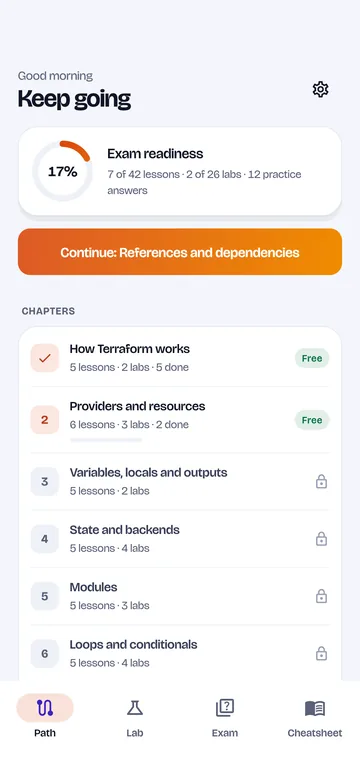
Planfile is an iPhone app that teaches Terraform with short lessons and Labs that run a simulated Terraform CLI and cloud on your phone. Its 8 chapters, 42 lessons and 26 Labs follow the 004 objectives for the core workflow, configuration, state and modules, and it has 74 original practice questions with an exam readiness score; questions you miss come back sooner. It does not simulate HCP Terraform (objective 8), so learn that domain with HashiCorp's own tutorials and an HCP Terraform account. Chapters 1 and 2 are free; a one-time $14.99 (US) unlocks the rest. Planfile is not affiliated with HashiCorp or IBM.
Questions
How much does the Terraform certification cost?
The Terraform Associate (004) exam costs $70.50 USD plus locally applicable taxes and fees. A free retake is not included.
How many questions are on the Terraform Associate 004 exam?
HashiCorp doesn't publish a question count or passing score for 004. It is a one-hour, multiple-choice exam, so practise answering at a steady pace.
How long is the HashiCorp Certified: Terraform Associate valid?
Two years. You can renew by passing the current Associate exam, starting six months before your credential expires.
What is the difference between Terraform Associate 003 and 004?
004 tests Terraform 1.12, includes HCP Terraform content, and adds four objectives: resource dependencies, custom conditions, sensitive data and Vault, and HCP Terraform workspaces and projects.
Is the Terraform Associate exam hard?
It is an associate-level exam, but it expects hands-on experience: many questions ask what Terraform would do in a given situation. With regular practice over a few weeks, most engineers who already know some cloud are ready.
How long should I study for the Terraform Associate certification?
Around four weeks at an hour a day is a common plan if you know a little cloud; less if you already use Terraform at work. Spend most of it writing and running configuration.