 Planfile
Terraform for_each and count: loops, conditionals and dynamic blocks
Terraform repeats resources with two meta-arguments. count = 3 creates numbered instances (aws_instance.web[0]) and gives you count.index. for_each takes a map or a set of strings and creates one instance per key (aws_s3_bucket.team["web"]), with each.key and each.value. Prefer for_each for collections: removing an item doesn't shift the others. dynamic blocks repeat nested blocks.
count: N copies of a resource
count is a meta-argument that every resource and module block accepts. Set it to a whole number and Terraform creates that many instances. Inside the block, count.index is the instance's number, starting at 0:
resource "aws_instance" "web" {
  count         = 3
  ami           = "ami-0abc1234"
  instance_type = "t3.micro"

  tags = {
    Name = "web-${count.index}"   # web-0, web-1, web-2
  }
}

output "web_ids" {
  value = aws_instance.web[*].id
}
The instances are addressed by index: aws_instance.web[0], aws_instance.web[1], aws_instance.web[2]. aws_instance.web on its own is now a list, which is why the output uses the splat expression [*].id to collect every ID. The Terraform count index also works for picking from a list: subnet_id = var.subnet_ids[count.index], or cidrsubnet(var.cidr, 8, count.index) to give each subnet its own range.
The value of count must be known at plan time. You can use variables and functions, like count = length(var.names), but not an attribute that only exists after apply.
for_each: one instance per key
for_each takes a map or a set of strings and creates one instance per element. Inside the block, each.key and each.value refer to the current element:
variable "teams" {
  type    = list(string)
  default = ["web", "api", "data"]
}

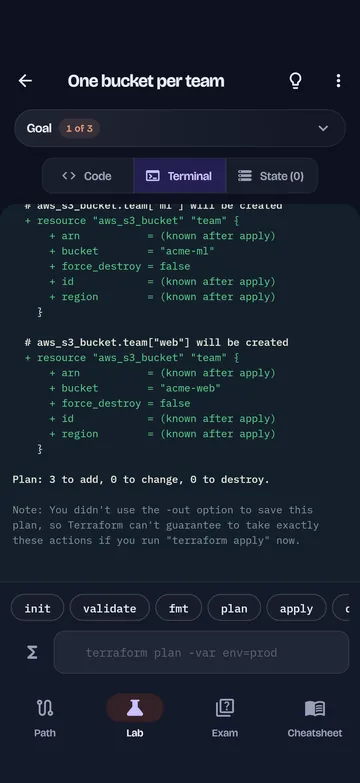
resource "aws_s3_bucket" "team" {
  for_each = toset(var.teams)
  bucket   = "acme-${each.key}"
}
For a set, each.key and each.value are the same string. The instances are addressed by key, not number:
  # aws_s3_bucket.team["api"] will be created
  + resource "aws_s3_bucket" "team" {
      + bucket = "acme-api"
      ...
  # aws_s3_bucket.team["data"] will be created
  ...
  # aws_s3_bucket.team["web"] will be created
  ...

Plan: 3 to add, 0 to change, 0 to destroy.
With a map, each element can carry its own settings, and each.value is the value for that key:
variable "buckets" {
  type = map(object({
    versioning = bool
  }))
  default = {
    logs   = { versioning = false }
    assets = { versioning = true }
  }
}

resource "aws_s3_bucket" "this" {
  for_each = var.buckets
  bucket   = "acme-${each.key}"
  tags     = { versioning = tostring(each.value.versioning) }
}
Refer to one instance as aws_s3_bucket.this["logs"]. The whole resource is a map of objects, so collect values with a for expression ({ for k, b in aws_s3_bucket.this : k => b.arn }) or values(aws_s3_bucket.this)[*].arn. On the command line, quote the address so the shell keeps the brackets and quotes: terraform state show 'aws_s3_bucket.team["web"]'.
for_each vs count: which to use
Both make multiple instances. The difference is how instances are identified, and it matters the moment the collection changes. Take three buckets made with count from a list, then remove the first name:
resource "aws_s3_bucket" "team" {
  count  = length(var.teams)
  bucket = "acme-${var.teams[count.index]}"
}

# teams = ["web", "api", "data"]  ->  ["api", "data"]
Instances are tracked by position, so every element after the removed one shifts down. Index 0 was web and is now api; index 1 was api and is now data; index 2 no longer exists. A bucket name can't change in place, so the plan replaces two buckets and destroys a third:
  # aws_s3_bucket.team[0] must be replaced
-/+ resource "aws_s3_bucket" "team" {
      ~ bucket = "acme-web" -> "acme-api" # forces replacement
  ...
  # aws_s3_bucket.team[1] must be replaced
-/+ resource "aws_s3_bucket" "team" {
      ~ bucket = "acme-api" -> "acme-data" # forces replacement
  ...
  # aws_s3_bucket.team[2] will be destroyed

Plan: 2 to add, 0 to change, 3 to destroy.
With for_each = toset(var.teams) the same change destroys only aws_s3_bucket.team["web"]: Plan: 0 to add, 0 to change, 1 to destroy. The other instances keep their keys.
count | for_each | |
|---|---|---|
| Takes | a whole number | a map or a set of strings |
| Instance address | res.name[0] | res.name["key"] |
| Inside the block | count.index | each.key, each.value |
| Removing an item from the middle | shifts later indexes: replacements | only that instance is destroyed |
| Best for | N identical copies; on/off switches | collections of distinct things |
Rule of thumb: use count for a number of identical things or for a conditional resource, and for_each whenever each instance corresponds to an item with an identity (a team, a user, a subnet). A resource can't have both; Terraform reports Invalid combination of "count" and "for_each". If you switch an existing resource from count to for_each, add moved blocks (from = aws_s3_bucket.team[0], to = aws_s3_bucket.team["web"]) so Terraform renames the instances instead of replacing them.
Terraform conditional resources
Terraform has no if statement for blocks. The conditional expression condition ? true_value : false_value combined with count does the job: 1 instance or none.
variable "create_logs" {
  type    = bool
  default = true
}

resource "aws_s3_bucket" "logs" {
  count  = var.create_logs ? 1 : 0
  bucket = "acme-logs"
}

output "logs_arn" {
  value = one(aws_s3_bucket.logs[*].arn)   # null when the bucket doesn't exist
}
Because count is set, the resource is a list even with one element: refer to it as aws_s3_bucket.logs[0], or use one() with a splat so the reference still works when the count is 0. terraform plan -var create_logs=false then plans to destroy it.
With for_each, the same trick uses an empty collection: for_each = var.enable_alarms ? var.alarms : {}. Both sides of a conditional must have compatible types; if Terraform complains about Inconsistent conditional result types, convert both, e.g. var.enabled ? toset(var.names) : toset([]).
Conditionals work for arguments too: instance_type = var.env == "prod" ? "m5.large" : "t3.micro".
for expressions: the for loop in Terraform
A for expression transforms one collection into another. It is the for loop in Terraform for values, as opposed to count and for_each, which repeat blocks. Square brackets produce a list (tuple); braces produce a map (object):
locals {
  names = ["web", "api"]

  upper_names = [for n in local.names : upper(n)]
  # ["WEB", "API"]

  bucket_names = { for n in local.names : n => "acme-${n}" }
  # { api = "acme-api", web = "acme-web" }

  prod_only = { for k, v in var.services : k => v if v.env == "prod" }
  # keeps only the entries where the condition is true
}
Over a list, for i, v in list gives the index and value; over a map, for k, v in map gives key and value. The optional if clause filters. A common pattern is to build the map that feeds for_each, or to flatten nested data (with flatten()) into one map with unique keys.
Terraform dynamic blocks
Some resources take repeated nested blocks, like the ingress rules of a security group. count and for_each repeat whole resources; a dynamic block repeats a nested block:
variable "ports" {
  type    = list(number)
  default = [80, 443]
}

resource "aws_security_group" "web" {
  name   = "web"
  vpc_id = aws_vpc.main.id

  dynamic "ingress" {
    for_each = var.ports
    content {
      description = "port ${ingress.value}"
      from_port   = ingress.value
      to_port     = ingress.value
      protocol    = "tcp"
      cidr_blocks = ["0.0.0.0/0"]
    }
  }
}
The label ("ingress") is the name of the nested block to generate. for_each takes any collection, and inside content the iterator is named after the label: ingress.value is the element and ingress.key is the index (for a list) or key (for a map). Rename it with iterator = rule if the label is long or nested dynamic blocks would clash.
With a list of objects you can set several arguments per rule:
dynamic "ingress" {
  for_each = var.rules   # list(object({ port = number, cidr = string }))
  content {
    from_port   = ingress.value.port
    to_port     = ingress.value.port
    protocol    = "tcp"
    cidr_blocks = [ingress.value.cidr]
  }
}
Use dynamic blocks when the number of nested blocks really varies; for two fixed rules, plain blocks are easier to read. Dynamic blocks can't generate meta-argument blocks such as lifecycle. For AWS security groups specifically, the provider now recommends separate aws_vpc_security_group_ingress_rule resources, which you would repeat with for_each instead.
Common errors
- The given "for_each" argument value is unsuitable: you passed a list. Wrap it in
toset(), or build a map. - Invalid for_each argument (keys cannot be determined until apply): the keys come from attributes that only exist after apply, such as IDs. Build keys from values in your configuration (names), not computed ones.
- Missing resource instance key: you wrote
aws_s3_bucket.logs.arnon a resource withcountorfor_each. Add[0]or["key"], or use a splat. - each.value in a resource with
count, orcount.indexwithfor_each: each meta-argument has its own object. - Sensitive values can't be used as
for_eachkeys, because keys appear in addresses and plan output.
Try it in a Lab
Planfile's chapter Loops and conditionals has a Lab for each section of this page: Three web servers (count and a splat), One bucket per team (for_each, then remove a team and check only its bucket is destroyed), An optional bucket (a conditional count) and Rules from a list (a dynamic "ingress" block).
Questions
What is the difference between count and for_each in Terraform?
count creates instances identified by number, for_each creates instances identified by a map key or set element. With count, removing an item from the middle of a list shifts every later index and causes replacements; with for_each only that item's instance changes.
Why does for_each not accept a list?
for_each needs unique keys, and a list can hold duplicates and is ordered. Convert it with toset(var.list), or build a map with a for expression.
How do I create a resource conditionally in Terraform?
Use count with a conditional expression: count = var.create ? 1 : 0. Refer to the resource as name[0], or one(name[*].attr) so the reference also works when it isn't created.
What is count.index in Terraform?
The zero-based number of the current instance in a resource or module that uses count. It is often used in names (web-${count.index}) or to pick an element from a list.
What is a dynamic block in Terraform?
A dynamic block generates repeated nested blocks, such as security group ingress rules, from a collection. Its for_each sets the collection and the content block defines each nested block.
Can I use count and for_each on the same resource?
No. A resource or module block can have one or the other. Terraform reports an invalid combination error if both are set.