 Planfile
Terraform functions: a practical guide with examples
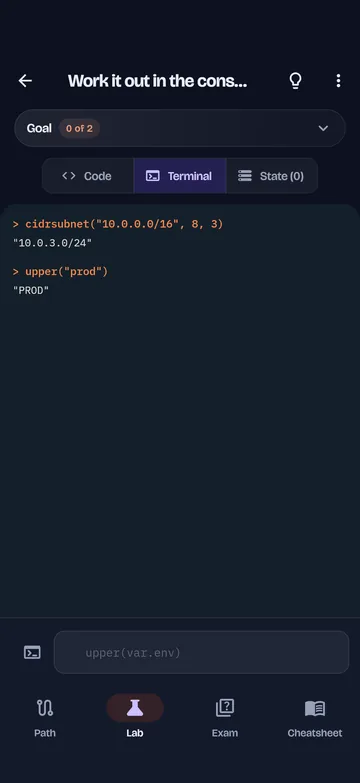
Terraform has built-in functions you call inside expressions, like upper("prod") or cidrsubnet("10.0.0.0/16", 8, 3), which returns "10.0.3.0/24". They cover strings, collections, numbers, encoding, files, IP networks and type conversion. You can't define your own, but since Terraform 1.8 providers can add functions. Use terraform console to try any function against your configuration and state.
How Terraform functions work
Terraform's expression language has a fixed set of built-in functions. You call them by name with arguments in parentheses, anywhere an expression is allowed: resource arguments, locals, outputs, conditions.
locals {
  name    = lower(trimspace(var.project))
  subnets = [for i in range(3) : cidrsubnet(var.vpc_cidr, 8, i)]
  tags    = merge(var.default_tags, { Name = upper(local.name) })
}
Three facts worth knowing up front:
- You can't write your own functions in HCL. Use locals to name repeated expressions, modules to reuse blocks, and provider-defined functions (below) for anything providers add.
- Functions are evaluated during plan where possible. If an argument is (known after apply), so is the result.
- Most functions are pure: same input, same output. The exceptions, like
timestamp()anduuid(), return a new value on every run and cause a change in every plan if you put them in a resource argument.
The fastest way to learn them is terraform console, covered at the end of this page. The examples below show results the way the console prints them.
String functions
| Function | Example | Result |
|---|---|---|
format | format("%s-%03d", "web", 7) | "web-007" |
join | join("-", ["foo", "bar", "baz"]) | "foo-bar-baz" |
split | split(",", "foo,bar,baz") | tolist(["foo", "bar", "baz"]) |
replace | replace("1 + 2 + 3", "+", "-") | "1 - 2 - 3" |
replace (regex) | replace("hello world", "/w.*d/", "everybody") | "hello everybody" |
upper | upper("prod") | "PROD" |
lower | lower("ACME") | "acme" |
trimspace | trimspace(" web ") | "web" |
Terraform string replace: replace(string, search, replacement) replaces every occurrence of a literal substring. Wrap the search in slashes to use a regular expression instead, as in the second row. format uses printf-style verbs (%s string, %d integer, %03d zero-padded to three digits); formatlist does the same for each element of a list.
For most string building, interpolation is simpler than a function: "acme-${var.env}-logs". Use format when you need padding or a reusable pattern, and join to turn a list into one string.
Collection functions: merge, lookup, zipmap and more
| Function | Example | Result |
|---|---|---|
length | length(["a", "b"]) | 2 |
merge | merge({a = "b", c = "d"}, {e = "f", c = "z"}) | { a = "b", c = "z", e = "f" } |
lookup | lookup({a = "ay", b = "bee"}, "c", "what?") | "what?" |
keys | keys({a = 1, c = 2, d = 3}) | ["a", "c", "d"] |
values | values({a = 3, c = 2, d = 1}) | [3, 2, 1] |
zipmap | zipmap(["a", "b"], [1, 2]) | { a = 1, b = 2 } |
flatten | flatten([["a", "b"], [], ["c"]]) | ["a", "b", "c"] |
concat | concat(["a", ""], ["b", "c"]) | ["a", "", "b", "c"] |
contains | contains(["a", "b", "c"], "a") | true |
toset | toset(["a", "b", "c", "b"]) | toset(["a", "b", "c"]) |
- Terraform merge combines maps or objects. When keys repeat, the last argument wins (
c = "z"above), which makes it the standard way to apply default tags and let callers override them:merge(local.default_tags, var.tags). - Terraform lookup reads a key from a map with a fallback. Without a default, a missing key is an error, the same as
var.map["key"]; always pass the third argument. - Terraform zipmap builds a map from a list of keys and a list of values of the same length, e.g.
zipmap(var.names, aws_instance.web[*].id)for a name-to-ID map. keysreturns keys in lexical order andvaluesreturns values in that same key order, so the two line up.flattenis the usual tool for nested loops: produce a list of lists with a for expression, flatten it, then turn it into a map forfor_each.tosetremoves duplicates and order; it is how you feed a list tofor_each.
Numeric, encoding and filesystem functions
| Function | Example | Result |
|---|---|---|
min | min(12, 54, 3) | 3 |
max | max(12, 54, 3) | 54 |
max (list) | max([12, 54, 3]...) | 54 |
jsonencode | jsonencode({"hello" = "world"}) | "{\"hello\":\"world\"}" |
base64encode | base64encode("Hello World") | "SGVsbG8gV29ybGQ=" |
min and max take separate arguments; to pass a list, expand it with .... jsonencode turns any Terraform value into a JSON string, which is the clean way to write IAM policies and other JSON documents instead of heredocs (its counterpart jsondecode parses JSON). yamlencode and yamldecode do the same for YAML.
resource "aws_iam_policy" "read_logs" {
  name = "read-logs"
  policy = jsonencode({
    Version = "2012-10-17"
    Statement = [{
      Effect   = "Allow"
      Action   = ["s3:GetObject"]
      Resource = "${aws_s3_bucket.logs.arn}/*"
    }]
  })
}
Filesystem functions read files at plan time, relative to a path you give. Use path.module so the path works wherever the module is called from. file reads a file as a string; templatefile renders a template with variables, including for and if directives:
# backends.tftpl
%{ for addr in ip_addrs ~}
backend ${addr}:${port}
%{ endfor ~}

# main.tf
locals {
  config = templatefile("${path.module}/backends.tftpl", {
    port     = 8080
    ip_addrs = ["10.0.0.1", "10.0.0.2"]
  })
}
# local.config is "backend 10.0.0.1:8080\nbackend 10.0.0.2:8080\n"
These functions only read files that exist before Terraform runs; they can't read a file that a resource creates during the same apply.
IP network functions: cidrsubnet and cidrhost
| Function | Example | Result |
|---|---|---|
cidrsubnet | cidrsubnet("10.0.0.0/16", 8, 3) | "10.0.3.0/24" |
cidrsubnet | cidrsubnet("172.16.0.0/12", 4, 2) | "172.18.0.0/16" |
cidrhost | cidrhost("10.12.112.0/20", 16) | "10.12.112.16" |
Terraform cidrsubnet takes a prefix, a number of bits to add to the mask, and a network number. In cidrsubnet("10.0.0.0/16", 8, 3), adding 8 bits to /16 gives /24 subnets, and number 3 is the fourth of them (counting from 0): 10.0.3.0/24. Combine it with count.index to carve a VPC into subnets without typing ranges:
resource "aws_subnet" "private" {
  count      = 3
  vpc_id     = aws_vpc.main.id
  cidr_block = cidrsubnet(aws_vpc.main.cidr_block, 8, count.index)
  # 10.0.0.0/24, 10.0.1.0/24, 10.0.2.0/24 for a 10.0.0.0/16 VPC
}
cidrhost(prefix, n) returns the n-th address in a range, handy for fixed private IPs. cidrsubnets (plural) allocates several consecutive subnets of different sizes in one call.
Type conversion and error handling: try, can, tostring
tostring(1)is"1",tonumber("5")is5;tolist,tosetandtomapconvert collections. Terraform converts types automatically in most places, so these are mainly for making both sides of a conditional the same type.try(expr1, expr2, ...)returns the first expression that evaluates without an error.try(var.settings.port, 8080)falls back to 8080 if the attribute is missing.can(expr)returnstrueif the expression works andfalseif it errors. It is the building block of variable validation:can(regex("^ami-", var.ami_id)).coalesce("", "b")returns"b": the first argument that isn't null or an empty string.one(list)returns the only element, or null for an empty list.sensitive(value)andnonsensitive(value)add or remove the sensitive mark.
Don't use try to hide real mistakes: it catches every error in the expression, including typos in attribute names.
Provider-defined functions
Since Terraform 1.8, providers can ship their own functions. You call them with the provider:: prefix, the provider's local name from required_providers, and the function name:
terraform {
  required_providers {
    aws = {
      source  = "hashicorp/aws"
      version = ">= 5.40"
    }
  }
}

output "account_id" {
  value = provider::aws::arn_parse(aws_s3_bucket.logs.arn).account_id
}
The provider must be declared in required_providers, and the provider version must include the function (the AWS provider added its first functions, such as arn_parse, in 5.40). Each provider's functions are listed in its documentation on the Terraform Registry.
terraform console: try functions interactively
terraform console opens an interactive prompt that evaluates expressions against your configuration and current state. It's the quickest way to check what a function returns before you put it in code:
$ terraform console
> cidrsubnet("10.0.0.0/16", 8, 3)
"10.0.3.0/24"
> upper("prod")
"PROD"
> var.env
"dev"
> aws_s3_bucket.logs.arn
"arn:aws:s3:::acme-dev-logs"
> exit- It sees variables (including
-varand tfvars), locals, and resource attributes from state. Resources not yet created show (known after apply). terraform console -planbuilds a plan first, so you can inspect planned values.- It doesn't change anything, but it holds the state lock while open, so close it before running apply.
- Exit with
exit, Ctrl-C or Ctrl-D. You can also pipe in an expression:echo 'max(3, 7)' | terraform consoleprints7. - You can't declare variables or resources in the console; it only evaluates expressions. Run
terraform initfirst in a directory with providers.
Common errors
- Call to unknown function: a typo, or a function from another tool (there is no
concat_wsorsprintf; usejoinandformat). Forprovider::functions, the provider isn't inrequired_providersor its version is too old. - Invalid function argument: wrong type, e.g. passing a list to
maxwithout..., or a map tojoin. - Invalid index or The given key does not identify an element: a map key is missing. Use
lookupwith a default, ortry. - A plan that changes on every run: a non-deterministic function such as
timestamp()oruuid()in a resource argument. Useplantimestamp()or arandomprovider resource instead, or ignore the attribute withignore_changes.
Try it in a Lab
Planfile's chapter Functions and expressions has a console built into the Lab. In Work it out in the console you find the fourth /24 of 10.0.0.0/16 with cidrsubnet and turn it into an output; Default tags with merge and Carve the subnets put merge() and cidrsubnet() with count.index to work in real configurations.
Questions
Can I create custom functions in Terraform?
No. Terraform only has built-in functions and, since 1.8, functions provided by providers. Use locals to name repeated expressions and modules to reuse blocks of configuration.
What does cidrsubnet do in Terraform?
It calculates a subnet inside a network prefix. cidrsubnet("10.0.0.0/16", 8, 3) adds 8 bits to the /16 mask and returns the fourth /24: "10.0.3.0/24".
What is the difference between merge and concat?
merge combines maps or objects, with later arguments overriding earlier keys. concat joins lists into one list.
How do I exit terraform console?
Type exit or press Ctrl-C or Ctrl-D.
How do I replace a string in Terraform?
Use replace(string, search, replacement), which replaces every occurrence. Put the search term between slashes, such as "/[0-9]+/", to match a regular expression.
What does lookup do in Terraform?
lookup(map, key, default) returns the value for key, or the default if the key is missing. Always pass a default; without one a missing key is an error.