 Planfile
Terraform variables, locals and outputs: a complete guide
Terraform input variables (variable blocks, read as var.name) are a module's parameters; you set them with .tfvars files, -var or TF_VAR_ environment variables. Locals (locals, read as local.name) name expressions inside a module. Outputs (output blocks) expose values to the caller and to terraform output. Together they turn one configuration into something you can reuse for dev and prod.
Terraform input variables: the variable block
An input variable is a parameter of a module. You declare it with a variable block, usually in variables.tf, and read it anywhere in the same module as var.NAME:
variable "env" {
  type        = string
  description = "Deployment environment"
  default     = "dev"
}

resource "aws_s3_bucket" "logs" {
  bucket = "acme-logs-${var.env}"
}
Inside a string, wrap the reference in ${ } (interpolation). Outside a string, write it bare: bucket = var.bucket_name. Every argument of the block is optional:
| Argument | What it does | Default |
|---|---|---|
type | Type constraint; values are converted to it or rejected | any |
default | Value used when nothing else sets one. Without it the variable is required | none (required) |
description | Documentation for users of the module; shown when Terraform prompts | none |
validation | Block with condition and error_message; repeatable | none |
sensitive | Hide the value in plan and apply output | false |
nullable | When false, null is not accepted as a value | true |
ephemeral | Value is available during the run but not written to state or plan files (1.10+) | false |
A variable with no default is required. If you run terraform plan without setting it, Terraform prompts for it interactively:
var.region
  AWS region to deploy into

  Enter a value:
In CI, pass -input=false so a missing value fails fast with No value for required variable instead of waiting for input. Recent releases add more arguments for specific cases, such as deprecated (1.15+) to warn callers of a module that an input is going away.
Variable types: string, list, map, object and optional()
Types catch mistakes at plan time instead of halfway through an apply. Terraform has three kinds:
- Primitive:
string,number,bool. - Collection (every element the same type):
list(string),set(string),map(number). - Structural (each element its own type):
object({ ... })with named attributes, andtuple([string, number])with positional elements.
A Terraform object variable describes a structured setting in one input. Mark attributes optional() so callers can leave them out; the second argument is the default used when they do (without it, the attribute is null):
variable "bucket" {
  type = object({
    name       = string
    versioning = optional(bool, false)
    tags       = optional(map(string), {})
  })
}

# terraform.tfvars
bucket = {
  name = "acme-logs"
}
# var.bucket.versioning is false, var.bucket.tags is {}
Combine them for one setting per item: map(object({ size = string, public = optional(bool, false) })) is a common shape to feed into for_each. Converting a list to a set drops duplicates and order. Attributes you pass that the object type doesn't declare are dropped during conversion, so a typo in an optional attribute name silently does nothing: check your spelling.
Terraform variable validation
A validation block rejects bad values before Terraform plans anything. condition must be true; otherwise Terraform stops and prints error_message. You can add several validation blocks to one variable.
variable "env" {
  type = string

  validation {
    condition     = contains(["dev", "staging", "prod"], var.env)
    error_message = "env must be dev, staging or prod."
  }
}

variable "bucket_name" {
  type = string

  validation {
    condition     = can(regex("^[a-z0-9.-]{3,63}$", var.bucket_name))
    error_message = "Bucket names are 3-63 lowercase letters, digits, dots or hyphens."
  }
}
$ terraform plan -var env=test
Error: Invalid value for variable
env must be dev, staging or prod.Since Terraform 1.9, a condition can refer to other variables, locals and data sources in the same module, not only the variable being validated. Before 1.9 that was an error, and the workaround was a precondition:
variable "min_size" { type = number }

variable "max_size" {
  type = number

  validation {
    condition     = var.max_size >= var.min_size
    error_message = "max_size must be at least min_size."
  }
}
can() turns an expression that would fail (like regex() with no match) into false, which makes it the usual helper in validations. For checks on resources rather than inputs, use preconditions and postconditions: see Terraform lifecycle.
How to set variables: tfvars, -var and TF_VAR_
A root module variable can get its value in six ways:
- The
defaultin thevariableblock. - An environment variable named
TF_VAR_plus the variable name:export TF_VAR_env=prod. terraform.tfvarsin the working directory, loaded automatically.terraform.tfvars.json, loaded automatically.- Any
*.auto.tfvarsor*.auto.tfvars.jsonfiles, loaded automatically. - The command line:
-var 'env=prod'or-var-file=prod.tfvars(plus variables set in an HCP Terraform workspace).
A tfvars file is plain assignments, no variable blocks:
# prod.tfvars
env            = "prod"
instance_count = 3
allowed_cidrs  = ["10.0.0.0/16", "10.1.0.0/16"]
tags = {
  team = "platform"
}
terraform plan -var-file=prod.tfvars
terraform apply -var 'env=prod' -var 'instance_count=3'
export TF_VAR_allowed_cidrs='["10.0.0.0/16"]' # lists and maps use JSON-style syntaxOnly terraform.tfvars, terraform.tfvars.json and *.auto.tfvars(.json) load automatically. Any other name, such as prod.tfvars, needs -var-file. For lists and maps, prefer a tfvars file over -var or environment variables to avoid shell quoting problems.
Terraform variable precedence
When the same variable is set in several places, Terraform loads them in a fixed order and the later source wins. From lowest to highest priority:
| Priority | Source |
|---|---|
| 1 (lowest) | default in the variable block |
| 2 | Environment variables TF_VAR_name |
| 3 | terraform.tfvars |
| 4 | terraform.tfvars.json |
| 5 | *.auto.tfvars / *.auto.tfvars.json, in lexical order of file name |
| 6 (highest) | -var and -var-file options, in the order given on the command line (and HCP Terraform workspace variables) |
So with env = "staging" in terraform.tfvars, export TF_VAR_env=dev, and terraform plan -var env=prod, the value is prod. Within the command line, the last option wins: -var-file=prod.tfvars -var env=qa gives qa. This order is a favourite Terraform Associate question; the trap is that environment variables rank below terraform.tfvars.
Two related errors: a -var for a variable that has no variable block is an error (Value for undeclared variable), while the same thing in a tfvars file is only a warning. Environment variables without a matching declaration are ignored.
Sensitive variables
sensitive = true hides a value in plan and apply output; Terraform shows (sensitive value) instead. Anything computed from it is treated as sensitive too.
variable "db_password" {
  type      = string
  sensitive = true
}
Sensitive only affects what is printed. The value is still stored in plain text in the state file and in saved plan files, so keep state in a backend with encryption and access control, and don't commit tfvars files that hold secrets. Better: let the secret come from a secrets manager such as Vault, or use an ephemeral variable (below) so it never reaches state.
Terraform locals
A local value is a named expression inside a module: a variable you compute instead of pass in. Declare them in a locals block (plural) and read them as local.NAME (singular):
locals {
  prefix = "acme-${var.env}"
  default_tags = {
    env        = var.env
    managed_by = "terraform"
  }
}

resource "aws_s3_bucket" "logs" {
  bucket = "${local.prefix}-logs"
  tags   = local.default_tags
}
Use locals to name an expression you would otherwise repeat, or to give a complicated expression a readable name. Callers can't set them, which is the difference from variables: a variable is an input, a local is an internal detail. Don't overdo it; a local that only renames var.x makes code harder to follow. The common error is writing locals.prefix or local { }; the block is locals, the reference is local..
Terraform outputs
An output exposes a value from a module. In the root module, outputs are printed after apply and saved in state, so scripts and other configurations can read them. In a child module, outputs are the only way to pass values back to the caller (module.NAME.OUTPUT).
output "bucket_arn" {
  description = "ARN of the logs bucket"
  value       = aws_s3_bucket.logs.arn
}

output "db_password" {
  value     = var.db_password
  sensitive = true
}
Arguments of the output block:
value(required): any expression.description: documentation for the module's users.sensitive: hide the value in CLI output. A root output whose value comes from something sensitive must set it, or Terraform fails with Output refers to sensitive values.depends_on: rarely needed; for an output that depends on a resource it doesn't reference.precondition: aconditionanderror_messagechecked before the output is stored, for example that an address is not empty.ephemeral: child modules only (1.10+); the value is passed to the caller but not stored in state.
output "api_url" {
  value = "https://${aws_lb.api.dns_name}"

  precondition {
    condition     = aws_lb.api.internal == false
    error_message = "The API load balancer must be internet-facing."
  }
}
The terraform output command
terraform output reads the root module's outputs from state. It doesn't refresh or plan, so it shows values from the last apply.
$ terraform output
bucket_arn = "arn:aws:s3:::acme-dev-logs"
db_password = <sensitive>

$ terraform output bucket_arn
"arn:aws:s3:::acme-dev-logs"

$ terraform output -raw bucket_arn
arn:aws:s3:::acme-dev-logs

$ terraform output -json
{
  "bucket_arn": {
    "sensitive": false,
    "type": "string",
    "value": "arn:aws:s3:::acme-dev-logs"
  },
  "db_password": {
    "sensitive": true,
    "type": "string",
    "value": "s3cr3t-value"
  }
}-rawprints a single string, number or bool with no quotes: use it in shell scripts (aws s3 ls "s3://$(terraform output -raw bucket_name)"). It doesn't work for lists or maps; use-jsonandjqfor those.-jsonprints every output (or one, if you name it) as JSON for tools.- A Terraform output marked sensitive shows as
<sensitive>in the plain listing, but-jsonand-rawprint the real value. Treat their output like a secret.
Other configurations can read outputs with the terraform_remote_state data source, or, in HCP Terraform, the tfe_outputs data source. See Terraform state.
Ephemeral variables and outputs
Terraform 1.10 added ephemeral values: data that is available while Terraform runs but is never written to the state or plan file. Mark a variable with ephemeral = true (or an output in a child module) and Terraform only lets you use it in places that don't persist it, such as provider configuration, other ephemeral values, and write-only resource arguments (1.11+) like a database password.
variable "db_password" {
  type      = string
  sensitive = true
  ephemeral = true
}
The difference from sensitive: sensitive hides a value on screen but stores it in state; ephemeral keeps it out of state altogether. Reference an ephemeral variable in a normal resource argument and validate fails.
Common errors and fixes
- No value for required variable: the variable has no default. Set it with a tfvars file,
-varorTF_VAR_name. - Reference to undeclared input variable: a typo, or the variable is declared in a different module. Each module only sees its own variables.
- Invalid value for input variable with a string is required or similar: the value doesn't match
type. Check quotes in tfvars and JSON syntax for lists on the command line. - Output refers to sensitive values: add
sensitive = trueto the root output, or usenonsensitive()only if you're certain the value is safe to print. - Variables not allowed: you used
var.where Terraform needs a value before variables exist, such as inside abackendblock. Use-backend-configwithterraform initinstead.
Try it in a Lab
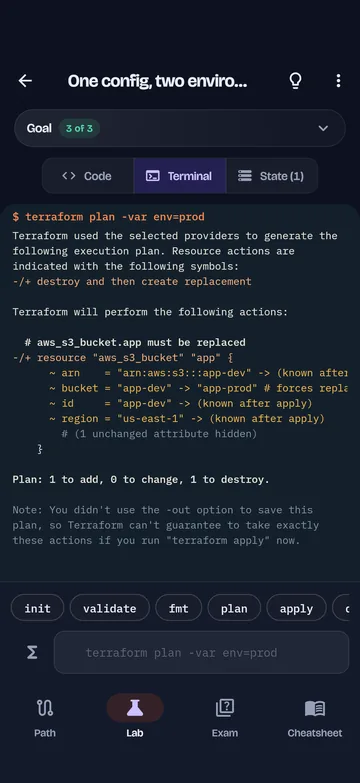
Planfile's chapter Variables, locals and outputs covers this page in five short lessons. In the Lab One config, two environments you add an env variable, apply, then run terraform plan -var env=prod and see the bucket name change force a replacement; Locals and outputs adds a local prefix and a bucket_arn output you read with terraform output. It all runs on a simulated cloud on your iPhone.
Questions
What is the order of precedence for Terraform variables?
From lowest to highest: the default, TF_VAR_ environment variables, terraform.tfvars, terraform.tfvars.json, *.auto.tfvars files in lexical order, then -var and -var-file options in the order given. The last value loaded wins.
What is the difference between Terraform variables and locals?
Variables are inputs that callers or the command line set. Locals are computed inside the module from expressions and can't be set from outside. Use a variable for something that changes per environment and a local to avoid repeating an expression.
What is a tfvars file in Terraform?
A file of variable assignments (name = value). terraform.tfvars and *.auto.tfvars load automatically; any other file is passed with -var-file=FILE.
How do I get a Terraform output value without quotes?
Use terraform output -raw NAME. It prints a string, number or bool without quotes, which is what shell scripts need. For lists and maps, use terraform output -json.
Is a sensitive output encrypted in Terraform state?
No. sensitive only hides the value in CLI output. It is stored in plain text in state, and terraform output -json or -raw prints it, so protect the state backend.
Can Terraform variable validation reference other variables?
Yes, since Terraform 1.9 a validation condition can refer to other variables, locals and data sources in the same module. Earlier versions only allowed the variable being validated.