 Planfile
Terraform lifecycle rules, depends_on and custom conditions
The lifecycle block changes how Terraform creates, updates and destroys one resource. create_before_destroy builds the replacement before removing the old object, prevent_destroy makes any plan that would destroy it fail, ignore_changes stops Terraform reverting attributes changed elsewhere, and replace_triggered_by replaces it when another resource changes. precondition and postcondition add custom checks. depends_on declares hidden dependencies.
What the lifecycle block is
By default Terraform decides the order and style of every change itself: update in place when it can, otherwise destroy the old object and create a new one, and treat every difference between configuration and reality as something to fix. The lifecycle block, nested in a resource, changes those defaults for that resource:
resource "aws_instance" "web" {
  ami           = var.ami
  instance_type = "t3.micro"

  lifecycle {
    create_before_destroy = true
    prevent_destroy       = false
    ignore_changes        = [tags]
    replace_triggered_by  = [terraform_data.release]

    precondition {
      condition     = startswith(var.instance_type, "t3.")
      error_message = "Use a t3 instance type."
    }
  }
}| Argument | Effect | Plan shows |
|---|---|---|
create_before_destroy | On replacement, create the new object first, then destroy the old one | +/- instead of -/+ |
prevent_destroy | Any plan that would destroy the resource fails | an error, no plan |
ignore_changes | Differences in the listed attributes are ignored after creation | no change for those attributes |
replace_triggered_by | Replace this resource when a referenced resource or attribute changes | -/+, due to changes in replace_triggered_by |
precondition / postcondition | Custom checks before planning / after applying | an error with your message when false |
The meta-arguments (create_before_destroy, prevent_destroy, ignore_changes, replace_triggered_by) are processed before Terraform evaluates expressions, so they only accept literal values and references, not variables: prevent_destroy = var.protect is an error. Conditions in precondition and postcondition are normal expressions and can use anything.
create_before_destroy
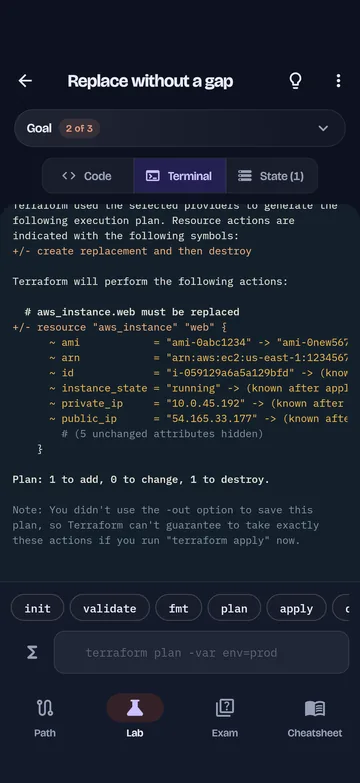
When an argument forces replacement, Terraform's default order is destroy, then create. For a server behind a load balancer, that means a gap. With create_before_destroy, Terraform creates the replacement first and only destroys the old object once the new one exists:
resource "aws_instance" "web" {
  ami           = "ami-0new5678"
  instance_type = "t3.micro"

  lifecycle {
    create_before_destroy = true
  }
}
# aws_instance.web must be replaced
+/- resource "aws_instance" "web" {
~ ami = "ami-0old1234" -> "ami-0new5678" # forces replacement
~ id = "i-0a1b2c3d4e5f" -> (known after apply)
# (2 unchanged attributes hidden)
}
Plan: 1 to add, 0 to change, 1 to destroy.Notes that matter in practice:
- It only changes the order of a replacement. In-place updates are unaffected.
- Both objects exist for a moment, so unique names collide. An S3 bucket with a fixed
bucketname can't be created before the old one is gone. Usename_prefix/bucket_prefixor a generated suffix where the provider supports it. - It propagates: resources this one depends on also get create-before-destroy behaviour, so Terraform can keep a consistent order.
prevent_destroy
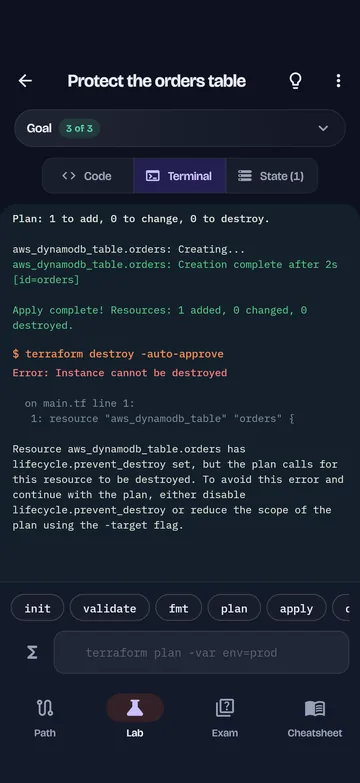
prevent_destroy = true makes Terraform refuse any plan that would destroy the resource, including a replacement and terraform destroy. Use it on things that hold data: databases, tables, buckets of user uploads.
resource "aws_dynamodb_table" "orders" {
  name         = "orders"
  billing_mode = "PAY_PER_REQUEST"
  hash_key     = "id"

  attribute {
    name = "id"
    type = "S"
  }

  lifecycle {
    prevent_destroy = true
  }
}
$ terraform destroy
Error: Instance cannot be destroyed
Resource aws_dynamodb_table.orders has lifecycle.prevent_destroy set, but
the plan calls for this resource to be destroyed. To avoid this error and
continue with the plan, either disable lifecycle.prevent_destroy or reduce
the scope of the plan using the -target flag.It guards against accidents, not against intent. If someone deletes the whole resource block, the lifecycle setting goes with it and the next plan destroys the table. It also doesn't stop anyone deleting the object in the cloud console. Combine it with the provider's own protection (such as deletion protection on databases) and backups. To stop managing a resource without destroying it, use a removed block with lifecycle { destroy = false } (1.7+).
ignore_changes
Sometimes another system legitimately changes a resource: a tagging policy adds a CostCenter tag, an autoscaler changes a desired count. Every plan then tries to undo it. ignore_changes tells Terraform to stop comparing the listed attributes after the resource is created:
resource "aws_instance" "web" {
  ami           = "ami-0abc1234"
  instance_type = "t3.micro"
  tags          = { Name = "web" }

  lifecycle {
    ignore_changes = [tags]   # or [tags["CostCenter"]] for just one key
  }
}
Before, the plan wanted to remove the outside tag:
  # aws_instance.web will be updated in-place
  ~ resource "aws_instance" "web" {
      ~ tags = {
          - "CostCenter" = "cc-42" -> null
            "Name"       = "web"
        }
    }
After adding ignore_changes, the plan reports no changes. The list takes attribute names without quotes, and can point into maps and lists (tags["CostCenter"]). ignore_changes = all ignores every attribute, which turns Terraform into a create-and-forget tool for that resource: use it rarely. Ignored attributes are still used when the resource is created, and changing them in your configuration later has no effect, which surprises people.
replace_triggered_by
replace_triggered_by (1.2+) replaces a resource when something else changes, even though none of its own arguments did. It takes a list of references to managed resources or their attributes:
resource "terraform_data" "release" {
  input = var.release
}

resource "aws_instance" "web" {
  ami           = "ami-0abc1234"
  instance_type = "t3.micro"

  lifecycle {
    replace_triggered_by = [terraform_data.release]
  }
}
Variables can't be listed directly, which is why the example wraps var.release in a terraform_data resource (1.4+). When the release changes, terraform_data.release is updated, and the plan says # aws_instance.web will be replaced due to changes in replace_triggered_by. A reference to a whole resource triggers on any update or replacement of it; a reference to one attribute (aws_ecs_service.svc.id) triggers only when that attribute changes. For a one-off replacement, use terraform apply -replace=ADDRESS instead; see taint and replace.
depends_on: implicit and explicit dependencies
Terraform builds a dependency graph from references. If resource B mentions an attribute of resource A, B depends on A, so A is created first and destroyed last. These implicit dependencies cover almost everything:
resource "aws_subnet" "a" {
  vpc_id     = aws_vpc.main.id   # implicit: the VPC is created first
  cidr_block = "10.0.1.0/24"
}
When a dependency exists that Terraform can't see in the configuration, declare it with depends_on. The classic case: software on an instance needs an IAM policy at boot, but the instance only references the instance profile, not the policy:
resource "aws_instance" "app" {
  ami                  = "ami-0abc1234"
  instance_type        = "t3.micro"
  iam_instance_profile = aws_iam_instance_profile.app.name

  depends_on = [aws_iam_role_policy.app_s3]   # explicit: hidden dependency
}
depends_on is a meta-argument, not part of lifecycle. It works on resources, data sources, modules (the whole module waits) and outputs, and takes a list of whole resources or modules, not attributes. Use it as a last resort and add a comment saying why: it makes plans more conservative, and on a data source it can defer the read until apply, which shows more (known after apply) values. terraform graph prints the graph if you need to see it.
Preconditions and postconditions
Custom conditions (1.2+) let a resource, data source or output state its assumptions. A precondition is checked before Terraform plans the change; a postcondition is checked after the resource is applied or the data source is read, and can use self to refer to the object's attributes:
data "aws_ami" "app" {
  most_recent = true
  owners      = ["self"]
  filter {
    name   = "name"
    values = ["app-*"]
  }
}

resource "aws_instance" "app" {
  ami           = data.aws_ami.app.id
  instance_type = var.instance_type

  lifecycle {
    precondition {
      condition     = data.aws_ami.app.architecture == "x86_64"
      error_message = "The AMI must be built for x86_64."
    }

    postcondition {
      condition     = self.instance_state == "running"
      error_message = "The app server did not start."
    }
  }
}
Error: Resource precondition failed
on main.tf line 16, in resource "aws_instance" "app":
16: condition = data.aws_ami.app.architecture == "x86_64"
├────────────────
│ data.aws_ami.app.architecture is "arm64"
The AMI must be built for x86_64.A failed precondition stops the plan. A failed postcondition stops the apply at that point and blocks resources that depend on it, but doesn't undo changes already made. Use preconditions for assumptions about inputs and other resources, postconditions for guarantees about what was created. Variable validation blocks are the right place for checks on a single input; see variables and outputs.
check blocks
A check block (1.5+) validates your infrastructure as a whole, outside any resource's lifecycle. It can include a scoped data source and one or more assert blocks:
check "site_health" {
  data "http" "site" {
    url = "https://www.example.com"
  }

  assert {
    condition     = data.http.site.status_code == 200
    error_message = "${data.http.site.url} returned ${data.http.site.status_code}."
  }
}
The difference from pre- and postconditions: a failed check is a warning, not an error. Terraform runs checks as the last step of every plan and apply and reports the result, but doesn't block anything. That makes them suited to health checks and continuous validation (HCP Terraform can run them on a schedule) rather than guard rails.
| Mechanism | Where | When | On failure |
|---|---|---|---|
validation | variable block | before planning | error |
precondition | resource, data source, output | before the object is planned | error |
postcondition | resource, data source | after apply or read | error |
check / assert | top-level block | end of plan and apply | warning |
Try it in a Lab
Planfile's chapter Lifecycle and dependencies has a Lab for each rule: Replace without a gap (create_before_destroy), Protect the orders table (prevent_destroy), Let the tagging policy be (ignore_changes), Replace on each release (replace_triggered_by with terraform_data) and Guard the instance type (a precondition). Each shows the real plan symbols, on a simulated cloud on your iPhone.
Questions
What does ignore_changes do in Terraform?
It tells Terraform to ignore differences in the listed attributes after the resource is created, so changes made by other systems (like tags added by a policy) are not reverted. ignore_changes = all ignores every attribute.
Does prevent_destroy stop me from deleting a resource block?
No. If you remove the resource block, the lifecycle setting is removed with it and Terraform plans to destroy the resource. prevent_destroy only blocks plans that destroy a resource still in the configuration.
When should I use depends_on in Terraform?
Only for dependencies Terraform can't infer from references, such as an instance that needs an IAM policy it doesn't reference. Normal references already create implicit dependencies.
Can I use a variable in a lifecycle block?
Not in the meta-arguments: create_before_destroy, prevent_destroy, ignore_changes and replace_triggered_by need literal values or references. Conditions inside precondition and postcondition can use variables.
What is the difference between a precondition and a check block?
A failed precondition is an error that stops the plan. A failed check block assertion is only a warning; checks run at the end of plan and apply and never block changes.
What does +/- mean in a Terraform plan?
The resource will be replaced with create_before_destroy: the new object is created first, then the old one is destroyed. Without it, a replacement shows -/+.