 Planfile
Terraform drift: how to detect it and how to fix it
Drift is when real infrastructure no longer matches Terraform's state, usually because someone changed it outside Terraform. terraform plan reports it as Objects have changed outside of Terraform. You then either revert it with a normal terraform apply, or keep it by updating your configuration and recording the real values with terraform apply -refresh-only. Scheduled plans catch drift early.
What is drift in Terraform?
Terraform keeps three things in step: your configuration, the state, and the real infrastructure. Drift is when the real infrastructure has changed and no longer matches what Terraform last recorded. Typical causes:
- Someone edits a resource in the cloud console during an incident and forgets to update the code.
- A script, another tool or a cloud policy changes it (for example a tagging policy that adds a
CostCentertag). - A service changes itself: an autoscaling group adjusts its desired capacity.
- An object is deleted outside Terraform.
Drift matters because the next apply acts on it. If you don't look, a routine apply can quietly undo a hotfix, or recreate something a colleague deleted on purpose.
How terraform plan detects drift
Every terraform plan and terraform apply starts with a refresh: Terraform asks the provider for the current values of every object in state. When those differ from state, the plan opens with a separate section before the actions:
$ terraform plan
aws_s3_bucket.logs: Refreshing state... [id=acme-logs]

Note: Objects have changed outside of Terraform

Terraform detected the following changes made outside of Terraform since the
last "terraform apply" which may have affected this plan:

  # aws_s3_bucket.logs has changed
  ~ resource "aws_s3_bucket" "logs" {
        id   = "acme-logs"
      ~ tags = {
          ~ "env" = "dev" -> "hotfix"
        }
    }

Terraform will perform the following actions:

  # aws_s3_bucket.logs will be updated in-place
  ~ resource "aws_s3_bucket" "logs" {
        id   = "acme-logs"
      ~ tags = {
          ~ "env" = "hotfix" -> "dev"
        }
    }

Plan: 0 to add, 1 to change, 0 to destroy.
Read the two parts separately. The first is what happened outside Terraform (dev -> hotfix). The second is what Terraform will do about it: put your configured value back (hotfix -> dev). If an object was deleted outside Terraform, the first part says it has been deleted and the plan creates it again.
Terraform only lists outside changes that are relevant to the plan, and the note is informational: nothing has been written yet. For more on plan output, see how to read terraform plan.
Fix 1: revert the drift with terraform apply
If the configuration is right and the outside change was a mistake, apply as usual. Terraform makes the real object match the code again:
$ terraform apply
...
  Enter a value: yes

aws_s3_bucket.logs: Modifying... [id=acme-logs]
aws_s3_bucket.logs: Modifications complete after 1s [id=acme-logs]

Apply complete! Resources: 0 added, 1 changed, 0 destroyed.
A second terraform plan should say No changes. Your infrastructure matches the configuration. Check with whoever made the change first: an emergency fix reverted by an unrelated apply is the classic way drift causes an outage.
Fix 2: keep the change with apply -refresh-only
If the outside change should stay, the configuration is what's out of date. Two steps:
- Update the configuration to the new value, so future plans don't try to undo it.
- Record reality in state with
terraform apply -refresh-only. It updates state to match the real objects and never changes infrastructure.
Say someone resized an instance from t3.micro to t3.small on purpose:
$ terraform apply -refresh-only
aws_instance.web: Refreshing state... [id=i-0a1b2c3d4e5f60718]

Note: Objects have changed outside of Terraform

Terraform detected the following changes made outside of Terraform since the
last "terraform apply" which may have affected this plan:

  # aws_instance.web has changed
  ~ resource "aws_instance" "web" {
        id            = "i-0a1b2c3d4e5f60718"
      ~ instance_type = "t3.micro" -> "t3.small"
    }

This is a refresh-only plan, so Terraform will not take any actions to undo
these. If you were expecting these changes then you can apply this plan to
record the updated values in the Terraform state without changing any remote
objects.

Would you like to update the Terraform state to reflect these detected changes?
  Terraform will write these changes to the state without modifying any real infrastructure.
  There is no undo. Only 'yes' will be accepted to confirm.

  Enter a value: yes

Apply complete! Resources: 0 added, 0 changed, 0 destroyed.
Then change instance_type = "t3.small" in the configuration. A normal plan now shows no changes. The order of the two steps doesn't matter much; what matters is that you do both. Refresh-only on its own leaves the configuration saying t3.micro, and the next normal apply would shrink the instance back.
Use terraform plan -refresh-only to preview what a refresh would record without writing anything. Refresh-only is also useful after outside changes to values your other resources or outputs read, so those references see the current values.
terraform refresh is deprecated
terraform refresh still exists, but HashiCorp's documentation marks it deprecated in favour of -refresh-only, which arrived in Terraform 0.15.4. The old command behaves like terraform apply -refresh-only -auto-approve: it writes to state without showing you anything or asking. That's risky. With misconfigured credentials or the wrong region, a provider can report that every object is gone, and terraform refresh would drop them all from state without a prompt. terraform apply -refresh-only shows the changes first and waits for yes.
| Command | Changes state? | Changes infrastructure? | Asks first? |
|---|---|---|---|
terraform plan | No | No | n/a |
terraform plan -refresh-only | No | No | n/a |
terraform apply -refresh-only | Yes | No | Yes |
terraform refresh (deprecated) | Yes | No | No |
terraform apply | Yes | Yes | Yes |
Expected drift: ignore_changes
Some differences aren't mistakes and will keep coming back: a policy that tags every server, an autoscaler that changes capacity. Reverting them on every apply is pointless. Tell Terraform to ignore those attributes after creation:
resource "aws_instance" "web" {
  ami           = "ami-0abc1234"
  instance_type = "t3.micro"

  tags = {
    Name = "web"
  }

  lifecycle {
    ignore_changes = [tags]
  }
}
Terraform still sets tags when it creates the instance, but no longer plans updates when the real tags differ. Keep the list narrow: ignore_changes = all hides every change, including ones you'd want to know about. More in Terraform lifecycle rules.
Terraform drift detection: run a plan on a schedule
Drift is only found when someone runs a plan. To catch it early, run one on a schedule and alert when it isn't clean. terraform plan -detailed-exitcode exits with 0 when there are no changes, 1 on an error and 2 when there are changes:
#!/usr/bin/env bash
terraform init -input=false
terraform plan -detailed-exitcode -input=false -no-color > plan.txt
case $? in
  0) echo "No drift" ;;
  2) echo "Drift or unapplied changes:"; cat plan.txt; exit 1 ;;
  *) echo "Plan failed"; exit 1 ;;
esac
Run it nightly from your CI system (a scheduled pipeline) with read-only credentials where possible, and send the failure to the team's channel. Exit code 2 means the real infrastructure and the configuration on that branch differ; if every merge to the branch is applied, that's drift. Don't use set -e in such a script, or the shell exits on code 2 before the case runs.
HCP Terraform health assessments
HCP Terraform has this built in. Health assessments include drift detection, which periodically compares workspaces with real infrastructure, and continuous validation, which re-checks preconditions, postconditions and check blocks. Assessments never change infrastructure; they report drift in the workspace so you can decide what to do. They are available on the HCP Terraform Standard and Premium editions and need remote or agent execution and at least one successful apply.
How to prevent drift
- Make Terraform the only way in. Limit write access in the console for Terraform-managed accounts; give people read-only roles and route changes through pull requests.
- Apply often. Small, frequent applies find drift while it's still small.
- Write hotfixes back. After an emergency console change, open a pull request that puts the same value in code the same day.
- Ignore what you can't control with targeted
ignore_changes, so real drift isn't lost in noise. - Detect on a schedule with a CI plan or HCP Terraform health assessments.
Try it in a Lab
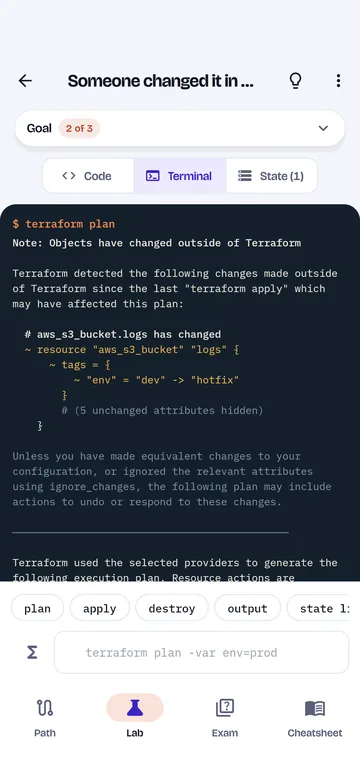
Planfile has both fixes as Labs. In Someone changed it in the console, a teammate has changed a bucket's env tag to hotfix: you read Objects have changed outside of Terraform in the plan and apply to put dev back. In Keep the change instead, an instance was resized on purpose: you record it with terraform apply -refresh-only and update the configuration until a plan shows no changes. The drift is simulated on your iPhone; no cloud account needed.
Questions
What is drift in Terraform?
Drift is a difference between the real infrastructure and Terraform's state, caused by changes made outside Terraform, such as edits in the cloud console or by another tool.
How does Terraform detect drift?
Every plan and apply refreshes state from the provider first. Differences appear under 'Objects have changed outside of Terraform', followed by the actions Terraform will take.
What does terraform apply -refresh-only do?
It updates the state to match the real infrastructure, after showing you the changes and asking for approval. It never creates, changes or destroys real resources.
Is terraform refresh deprecated?
Yes. Use terraform apply -refresh-only instead, or terraform plan -refresh-only to preview. The old command updates state without asking, which is risky if credentials or region are wrong.
How do I set up Terraform drift detection?
Run terraform plan -detailed-exitcode on a schedule in CI and alert on exit code 2, or turn on health assessments in HCP Terraform (Standard and Premium), which include drift detection.
How do I stop Terraform reverting a change made outside it?
Put the new value in your configuration. If the attribute is changed by something you don't control, such as a tagging policy, add it to lifecycle ignore_changes.