 Planfile
terraform apply and terraform destroy: how they work and how to use them safely
terraform apply makes a plan, shows it, and after you type yes creates, updates or destroys real resources and records the result in state. terraform apply tfplan runs a saved plan without asking again. terraform destroy is terraform apply -destroy: it plans to delete everything in state and asks for confirmation. To delete one resource, remove its block and apply; -target is for exceptions.
What terraform apply does
terraform apply is the step that changes real infrastructure. Run without a plan file, it:
- Refreshes state and builds a plan, exactly like
terraform plan. - Prints the plan and asks you to approve it.
- Calls the providers to create, update and destroy objects, in dependency order, running independent operations in parallel.
- Writes the result to state as it goes, then prints the root module outputs.
$ terraform apply

Terraform will perform the following actions:

  # aws_s3_bucket.logs will be created
  + resource "aws_s3_bucket" "logs" {
      + arn    = (known after apply)
      + bucket = "planfile-logs"
      + id     = (known after apply)
      ...
    }

Plan: 1 to add, 0 to change, 0 to destroy.

Changes to Outputs:
  + bucket_arn = (known after apply)

Do you want to perform these actions?
  Terraform will perform the actions described above.
  Only 'yes' will be accepted to approve.

  Enter a value: yes

aws_s3_bucket.logs: Creating...
aws_s3_bucket.logs: Creation complete after 2s [id=planfile-logs]

Apply complete! Resources: 1 added, 0 changed, 0 destroyed.

Outputs:

bucket_arn = "arn:aws:s3:::planfile-logs"
Only the exact word yes approves. Anything else, including y, cancels with Apply cancelled and changes nothing.
Apply a saved plan
Between your plan and your apply, someone else may change the infrastructure or merge new code, so the plan apply shows you could differ from the one you reviewed. To apply exactly what you reviewed, save the plan and apply the file:
terraform plan -out=tfplan
terraform apply tfplan
A saved plan is applied without another prompt: saving it was the approval. If state has changed since the plan was made, Terraform refuses with Saved plan is stale, and you plan again. This plan, review, apply-the-file pattern is how most CI pipelines run Terraform. Plan files can contain sensitive values, so don't commit them.
terraform apply -auto-approve: when it's OK
terraform apply -auto-approve skips the yes prompt and applies whatever plan it makes. That's fine when:
- The pipeline has already shown a plan to a human, who approved it (better still, apply the saved plan file, which never prompts).
- You are in a throwaway sandbox or a test that creates and destroys its own resources.
It's a bad idea when you run Terraform by hand against shared or production infrastructure: you approve a plan you never read. The same goes for terraform destroy -auto-approve. In automation, also pass -input=false, so Terraform fails instead of waiting for input that never comes, for example a missing variable.
terraform apply -target: applying one resource
-target limits the plan to one resource (or module) and the things it depends on:
$ terraform apply -target=aws_s3_bucket.logs
...
Warning: Resource targeting is in effect

You are creating a plan with the -target option, which means that the result
of this plan may not represent all of the changes requested by the current
configuration.

The -target option is not for routine use, and is provided only for
exceptional situations such as recovering from errors or mistakes, or when
Terraform specifically suggests to use it as part of an error message.
Take the warning literally. A targeted apply leaves the rest of your configuration unapplied, so state and code drift apart, and the next full plan may include surprises. Use it to get out of trouble, for example to create a resource whose value another resource needs before it can be planned, and follow it with a normal terraform apply. Repeat -target for several addresses; quote addresses with for_each keys: -target='aws_s3_bucket.team["web"]'.
Other terraform apply options
| Option | What it does |
|---|---|
PLANFILE | Apply a saved plan, with no prompt |
-auto-approve | Skip the approval prompt |
-var 'name=value', -var-file=FILE | Set input variables (not allowed with a saved plan, which already has them) |
-replace=ADDRESS | Destroy and recreate a resource even though nothing changed. See taint and -replace |
-target=ADDRESS | Apply only that resource and its dependencies |
-refresh-only | Update state to match real objects; change nothing else. See drift |
-destroy | Destroy everything; the same as terraform destroy |
-parallelism=N | How many operations run at once (default 10). Lower it if a provider hits API rate limits |
-lock-timeout=5m | Wait for a state lock instead of failing at once |
-input=false | Never prompt for input; for automation |
When an apply fails part-way
Applies aren't transactions. If one operation fails, Terraform stops starting new ones, waits for those already running, and reports the error. There's no rollback. Anything that was created, changed or destroyed before the failure stays that way and is recorded in state.
aws_vpc.main: Creating...
aws_vpc.main: Creation complete after 2s [id=vpc-0a1b2c3d4e5f60718]
aws_subnet.a: Creating...
aws_instance.web: Creating...

Error: creating EC2 Instance: InvalidAMIID.NotFound: The image id '[ami-0abc1234]' does not exist
Here the VPC exists and is in state, the subnet may have finished too, and the instance was never created. Fix the cause and run terraform apply again: the new plan only contains what's still missing. A resource that was created but failed to finish setting up (for example, its provisioner failed) is marked tainted and replaced on the next apply.
If Terraform can't write state at the end, for instance because the backend is unreachable, it saves it locally as errored.tfstate. Push that to the backend with terraform state push errored.tfstate before doing anything else, or Terraform will forget what it just built.
terraform destroy
terraform destroy deletes everything managed by the current configuration and workspace. It is an alias for terraform apply -destroy: Terraform plans to destroy every resource in state, shows that plan and asks for confirmation:
$ terraform destroy
...
Plan: 0 to add, 0 to change, 3 to destroy.

Do you really want to destroy all resources?
  Terraform will destroy all your managed infrastructure, as shown above.
  There is no undo. Only 'yes' will be accepted to confirm.

  Enter a value: yes

aws_s3_bucket.scratch: Destroying... [id=acme-scratch]
aws_subnet.a: Destroying... [id=subnet-0c9d8e7f6a5b4c3d2]
aws_s3_bucket.scratch: Destruction complete after 1s
aws_subnet.a: Destruction complete after 1s
aws_vpc.main: Destroying... [id=vpc-0a1b2c3d4e5f60718]
aws_vpc.main: Destruction complete after 1s

Destroy complete! Resources: 3 destroyed.
Destruction runs in reverse dependency order: the subnet goes before the VPC it lives in. Only resources in state are affected; anything created outside Terraform is left alone.
terraform plan -destroy: preview a destroy
terraform plan -destroy shows the destroy plan without doing anything. Save it with terraform plan -destroy -out=destroy.tfplan and run it with terraform apply destroy.tfplan for a reviewed teardown in a pipeline.
How to destroy a specific resource
There are three ways, and the first is usually right.
1. Remove it from the configuration
Delete the resource block and apply. The plan shows why the resource is going:
  # aws_s3_bucket.scratch will be destroyed
  # (because aws_s3_bucket.scratch is not in configuration)
  - resource "aws_s3_bucket" "scratch" {
      ...
    }

Plan: 0 to add, 0 to change, 1 to destroy.
Code and infrastructure stay in agreement, and the change goes through review like any other. With count or for_each, removing a key from the set destroys only that instance. A removed block (Terraform 1.7+) in place of the resource block does the same and lets you add destroy-time provisioners.
2. terraform destroy -target
terraform destroy -target=aws_s3_bucket.scratchThis destroys that resource and everything that depends on it, so read the plan. The resource block is still in your configuration, so the next normal apply will create it again. Use it for a quick fix, not as a way to manage what exists.
3. Replace instead of destroy
If what you really want is a fresh copy, use terraform apply -replace=ADDRESS rather than destroying and re-applying.
Protect resources with prevent_destroy
For a database or a bucket with data, add prevent_destroy so no plan can delete it:
resource "aws_dynamodb_table" "orders" {
  name     = "orders"
  hash_key = "id"

  attribute {
    name = "id"
    type = "S"
  }

  lifecycle {
    prevent_destroy = true
  }
}
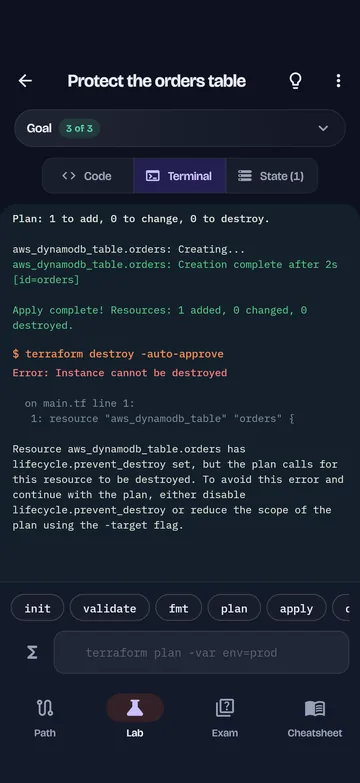
Any plan that would destroy it, including terraform destroy and a change that forces replacement, now fails with Instance cannot be destroyed, and nothing at all is applied. It only protects while the block and the setting are in the configuration: delete the whole resource block and the guard goes with it. More in Terraform lifecycle rules.
Reading outputs after apply
Apply prints the root module outputs at the end. Read them again any time without applying:
$ terraform output
bucket_arn = "arn:aws:s3:::planfile-logs"

$ terraform output -raw bucket_arn
arn:aws:s3:::planfile-logs

$ terraform output -json
-raw prints a single string without quotes for shell scripts; -json prints all outputs for tools. Sensitive outputs show as <sensitive> in the list but are printed by -raw and -json. See variables and outputs.
Common apply and destroy errors
- Saved plan is stale: state changed after you saved the plan. Run
terraform plan -outagain. - Error acquiring the state lock: another run is in progress. Wait, or use
terraform force-unlockif the lock is left over from a crashed run. - Instance cannot be destroyed: the resource has
prevent_destroy = true. Remove the setting deliberately if you really mean it. - Resource already exists (from the provider): the object exists but isn't in state. Import it instead of creating it.
- Destroy fails on a non-empty bucket: S3 won't delete a bucket that still has objects unless
force_destroy = truewas set and applied on the bucket first.
Try it in a Lab
Planfile's first Lab, Your first apply, runs init, plan and apply on an S3 bucket and checks that a second plan finds nothing to do. Tear it down previews with terraform plan -destroy and destroys a VPC, subnet and bucket so you can see the order, and Protect the orders table shows prevent_destroy stopping a destroy. The Labs run on a simulated cloud on your iPhone.
Questions
What does terraform apply do?
It refreshes state, creates a plan, asks for approval, then makes the planned changes to real infrastructure and saves the result to state. With a saved plan file, it applies that plan without asking.
How do I run terraform apply without the yes prompt?
Use terraform apply -auto-approve, or apply a saved plan with terraform apply tfplan. Only skip the prompt when a person has reviewed the plan or the environment is disposable.
How do I destroy a specific resource in Terraform?
Remove its resource block (or key from for_each) and run terraform apply. terraform destroy -target=ADDRESS also works, but it destroys dependent resources too and leaves the block in your configuration.
What is the difference between terraform destroy and terraform apply -destroy?
None in effect: terraform destroy is an alias for terraform apply -destroy. terraform plan -destroy previews the same plan without applying it.
What happens if terraform apply fails halfway?
Changes made before the error stay in place and are saved in state; there is no rollback. Fix the cause and run terraform apply again to finish the remaining changes.
Is terraform apply -target safe?
It's meant for exceptional cases such as recovering from errors. It leaves the rest of the configuration unapplied, so follow it with a normal terraform apply.