 Planfile
Terraform state: the state file, backends, locking and state commands
Terraform state is the record of what Terraform manages: a JSON file, terraform.tfstate, that maps each resource in your configuration to the real object's ID and attributes. Terraform reads it on every plan to work out what to change. By default it is a local file; teams keep it in a remote backend such as S3 with locking. It can contain secrets in plain text, so never commit it.
What is Terraform state and why does it exist?
Terraform describes infrastructure in configuration, but the cloud doesn't know which objects came from which block. State is the link. For every resource instance Terraform manages, state records its address in your configuration (aws_s3_bucket.logs) and the ID of the real object (acme-logs), plus every attribute the provider returned.
Terraform uses state to:
- Map configuration to real objects. Without state, Terraform couldn't tell whether
aws_instance.webalready exists or must be created. - Work out what to change.
terraform planrefreshes state from the provider, compares it with the configuration and plans the difference. - Track metadata, such as dependencies, so it can destroy resources in the right order even after their blocks are gone from the configuration.
- Cache attribute values, so references like
aws_vpc.main.idresolve without calling the API for every object.
State is also why Terraform can delete things: remove a resource block and the object is still in state, so the plan shows it as - destroy. Objects that were never in state are invisible to Terraform until you import them.
What's in the terraform.tfstate file?
The state file is JSON. You should never edit it by hand, but it helps to know what's inside:
{
  "version": 4,
  "terraform_version": "1.12.2",
  "serial": 7,
  "lineage": "3f6c2a1e-8b4d-4e57-9a0c-2d1f5b6e7a90",
  "outputs": {
    "bucket_arn": {
      "value": "arn:aws:s3:::acme-logs",
      "type": "string"
    }
  },
  "resources": [
    {
      "mode": "managed",
      "type": "aws_s3_bucket",
      "name": "logs",
      "provider": "provider[\"registry.terraform.io/hashicorp/aws\"]",
      "instances": [
        {
          "schema_version": 0,
          "attributes": {
            "arn": "arn:aws:s3:::acme-logs",
            "bucket": "acme-logs",
            "id": "acme-logs",
            "tags": { "env": "dev" }
          },
          "sensitive_attributes": []
        }
      ]
    }
  ]
}| Field | What it means |
|---|---|
version | The state file format (4 for all current Terraform versions) |
terraform_version | The Terraform version that last wrote it. An older Terraform refuses to work with state written by a newer one |
serial | Increases every time the state is written. Backends use it to reject stale writes |
lineage | A UUID set when the state was first created. Two files with different lineages are different states, not versions of one |
outputs | Root module output values |
resources | Every managed resource and data source, with each instance's attributes (one per count index or for_each key) |
Sensitive values are stored in plain text
State holds every attribute, including database passwords, private keys and tokens. Marking a variable or output sensitive = true hides it in plan output, but the value is still written to state unencrypted. (Write-only arguments, added in Terraform 1.11, are the exception: providers that offer them never store those values in state.) So:
- Never commit state to Git. Add
*.tfstateand*.tfstate.*to.gitignore. - Keep it in a backend that encrypts at rest and restricts who can read it.
- Treat read access to state as read access to every secret in it.
The local backend: where state lives by default
A backend decides where state is stored. With no backend configured, Terraform uses the local backend: state is the file terraform.tfstate in the working directory, and each write keeps the previous version as terraform.tfstate.backup. Non-default workspaces get their own files under terraform.tfstate.d/<name>/.
The local backend is fine for learning and for one person. It breaks down in a team: the file lives on one laptop, nobody else sees the latest version, and if it is lost Terraform forgets everything it built. The objects keep running, but Terraform would plan to create them again.
Remote state: the terraform backend "s3" example
A remote backend stores state in shared storage so people and CI pipelines all work from the same copy, and most remote backends lock it during operations. Configure it in the terraform block. This is the S3 backend with S3-native locking:
terraform {
  backend "s3" {
    bucket       = "acme-terraform-state"
    key          = "network/terraform.tfstate"
    region       = "us-east-1"
    encrypt      = true
    use_lockfile = true
  }
}bucketmust already exist. Create it once, outside this configuration, and turn on bucket versioning so you can recover an earlier state.keyis the object path. Give every configuration its own key.encryptturns on server-side encryption of the state object.use_lockfile = trueturns on locking. Terraform writes a lock object next to the state (network/terraform.tfstate.tflock) and removes it when it finishes. Locking is off by default, so set it.
use_lockfile vs dynamodb_table
S3-native locking arrived in Terraform 1.10 and became generally available in 1.11. Before that, the S3 backend needed a DynamoDB table for locking (dynamodb_table = "terraform-locks"). The DynamoDB arguments are now deprecated and, according to the S3 backend documentation, will be removed in a future minor version. New setups should use use_lockfile. If you set both during a migration, Terraform acquires both locks. With use_lockfile, the identity running Terraform needs s3:GetObject, s3:PutObject and s3:DeleteObject on the lock file.
Backend blocks can't use variables
Backend arguments must be literal values: no var., local. or functions, because the backend is set up before anything else is evaluated. To vary them per environment, leave them out of the block (partial configuration) and pass them to terraform init:
terraform init -backend-config=prod.s3.tfbackendWhenever you add or change a backend, run terraform init again. To copy existing state into the new backend, use terraform init -migrate-state; to switch without copying, -reconfigure. More in the terraform init guide.
Other common backends: azurerm (Azure Blob Storage), gcs (Google Cloud Storage) and consul, each with built-in locking, and HCP Terraform through the cloud block (below).
Terraform state lock and force-unlock
State locking stops two operations writing the same state at once, which could corrupt it or lose changes. On backends that support it, locking is automatic: Terraform takes the lock for every operation that could write state (plan, apply, destroy, import and the state subcommands among them) and releases it at the end. The local backend locks too, using the operating system's file locks.
If someone else holds the lock, your command stops:
Error: Error acquiring the state lock

Lock Info:
  ID:        6f2b0c1d-1e8a-4b9a-a3c4-0d5e7f9a1b2c
  Path:      acme-terraform-state/network/terraform.tfstate
  Operation: OperationTypeApply
  Who:       ci@runner-42
  Version:   1.12.2
  Created:   2026-11-26 09:14:03.512 +0000 UTC
  Info:

Terraform acquires a state lock to protect the state from being written
by multiple users at the same time. Please resolve the issue above and try
again. For most commands, you can disable locking with the "-lock"
flag, but this is not recommended.
Usually the right move is to wait: someone's apply is running. Add -lock-timeout=5m to retry for a while instead of failing at once (useful in CI).
A lock can be left behind when a run is killed: a CI job cancelled mid-apply, a laptop that lost its connection. Once you are sure no Terraform process is still using the state, release it with the ID from the error:
terraform force-unlock 6f2b0c1d-1e8a-4b9a-a3c4-0d5e7f9a1b2cterraform force-unlock asks for confirmation (-force skips it) and only removes the lock; it doesn't touch the state itself. Unlocking while another apply is genuinely running is how state gets corrupted, so check first. Avoid -lock=false for the same reason.
Terraform state commands: list, show, mv, rm, pull, push
Never edit the state JSON by hand. The terraform state subcommands read and change it safely, with locking and a backup.
terraform state list
Prints every resource address in state. Pass an address prefix to filter it:
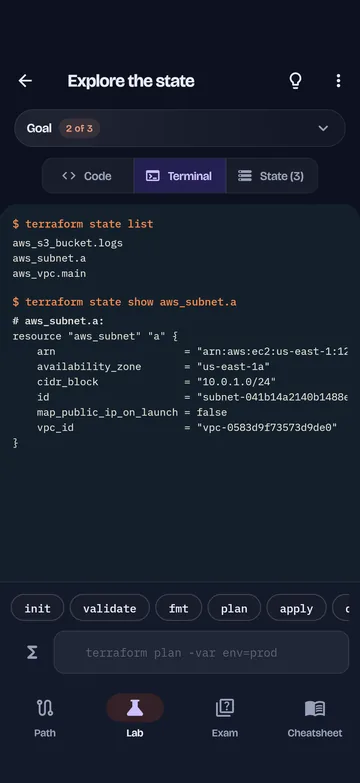
$ terraform state list
aws_s3_bucket.logs
aws_subnet.a
aws_vpc.main

$ terraform state list module.network
terraform state show
Prints one resource instance with all its attributes, in HCL-like form. Sensitive attributes are shown as (sensitive value).
$ terraform state show aws_subnet.a
# aws_subnet.a:
resource "aws_subnet" "a" {
    cidr_block = "10.0.1.0/24"
    id         = "subnet-0c9d8e7f6a5b4c3d2"
    vpc_id     = "vpc-0a1b2c3d4e5f60718"
    # ...
}
terraform show prints the whole state the same way; terraform show -json gives machine-readable JSON for scripts.
terraform state mv
Changes the address of an object in state, so Terraform treats it as the same object under a new name instead of destroying and recreating it:
$ terraform state mv aws_instance.web aws_instance.app
Move "aws_instance.web" to "aws_instance.app"
Successfully moved 1 object(s).
It changes state immediately, with no plan to review. Since Terraform 1.1, a moved block does the same through a normal plan and lives in version control, which is usually better.
terraform state rm
Makes Terraform forget an object without destroying it. The real resource keeps running; Terraform just stops managing it:
$ terraform state rm aws_s3_bucket.legacy
Removed aws_s3_bucket.legacy
Successfully removed 1 resource instance(s).
Remove the resource block from the configuration as well, or the next plan will try to create it again. -dry-run lists what would be removed. Since Terraform 1.7, a removed block with lifecycle { destroy = false } does the same through plan and apply (see the import guide).
terraform state pull and push
terraform state pull downloads the current state from the backend and prints the JSON, which is handy for inspecting remote state or taking a manual backup:
terraform state pull > backup.tfstateterraform state push FILE uploads a local state file and overwrites the remote one. Terraform refuses if the lineage differs or the serial is older than the remote state; -force overrides that check, which is rarely a good idea. Push is a recovery tool, for example after a failed apply left an errored.tfstate file because the backend couldn't be reached.
| Command | Changes state? | Use it to |
|---|---|---|
terraform state list | No | See what Terraform manages |
terraform state show ADDR | No | Read one resource's attributes |
terraform state mv FROM TO | Yes | Rename or move into a module (prefer moved) |
terraform state rm ADDR | Yes | Stop managing without destroying (or removed) |
terraform state pull | No | Print or back up remote state |
terraform state push FILE | Yes | Recover state; overwrites the backend |
terraform state replace-provider | Yes | Point resources at a different provider source |
All of these are summarised on the Terraform commands cheat sheet.
terraform_remote_state: reading another configuration's outputs
Large setups split infrastructure into several configurations: one for the network, one per application. The terraform_remote_state data source lets one read the root module outputs of another:
data "terraform_remote_state" "network" {
  backend = "s3"
  config = {
    bucket = "acme-terraform-state"
    key    = "network/terraform.tfstate"
    region = "us-east-1"
  }
}

resource "aws_instance" "web" {
  ami           = "ami-0abc1234"
  instance_type = "t3.micro"
  subnet_id     = data.terraform_remote_state.network.outputs.subnet_id
}
Only outputs of the other configuration's root module are available, under .outputs. The catch: to read them, the caller needs read access to the entire state snapshot, secrets included. HashiCorp's documentation therefore recommends alternatives:
- Publish values somewhere meant for sharing, such as AWS SSM Parameter Store (write with the
aws_ssm_parameterresource, read with the data source of the same name). - Look the object up directly with a provider data source, for example an
aws_subnetdata source filtered by tags. - On HCP Terraform, use the
tfe_outputsdata source, which reads outputs without exposing the rest of the state.
HCP Terraform as a backend: the cloud block
HCP Terraform (formerly Terraform Cloud) stores state for you, with locking, encryption, version history and access control built in. Connect a configuration with a cloud block instead of a backend block:
terraform {
  cloud {
    organization = "acme"

    workspaces {
      name = "network-prod"
    }
  }
}
Run terraform login once to get an API token, then terraform init. If you already have local or S3 state, init offers to migrate it. With remote execution, plans and applies run in HCP Terraform and the CLI streams the output. A configuration can have a cloud block or a backend block, not both.
Terraform state best practices
- Use a remote backend with locking for anything shared: S3 with
use_lockfile = true, azurerm, gcs or HCP Terraform. - Turn on versioning on the state bucket so a bad write can be rolled back.
- Restrict and encrypt. State contains secrets; limit who can read the bucket or workspace.
- Never commit
.tfstatefiles, and don't pass state around by hand. - Split state by environment and component (separate keys or workspaces) to limit how much one apply can touch and keep plans fast.
- Change state through Terraform:
moved,removedandimportblocks first,terraform statecommands second, never a text editor. - Don't force-unlock until you know the other run is dead.
- Pin the Terraform version across the team and CI (
required_version), since newer versions can upgrade state that older ones then can't read.
Common Terraform state errors
- Error acquiring the state lock: another run holds the lock. Wait, use
-lock-timeout, orterraform force-unlock LOCK_IDif the lock is stale. - Backend initialization required or Backend configuration changed: run
terraform initwith-migrate-stateor-reconfigure. - State snapshot was created by Terraform v1.x, which is newer than current: someone applied with a newer version. Upgrade your Terraform to match.
- Failed to save state: the backend was unreachable at the end of an apply. Terraform writes
errored.tfstatelocally; push it withterraform state push errored.tfstateonce the backend is back. - Plan wants to create resources that already exist: you are pointing at the wrong or an empty state (wrong key, workspace or backend). Check before applying.
Try it in a Lab
Planfile's chapter State and backends covers this page. In the Lab Explore the state you run terraform state list, terraform state show aws_subnet.a and terraform show against a VPC, a subnet and a bucket that already exist. Later Labs in the chapter cover drift and renaming with moved. Everything runs on a simulated cloud on your iPhone.
Questions
What is the Terraform state file?
terraform.tfstate is a JSON file in which Terraform records every resource it manages, the real object's ID and its attributes. Terraform compares it with your configuration to plan changes.
Should I commit terraform.tfstate to Git?
No. State can hold passwords and keys in plain text, and a copy in Git goes stale and invites conflicts. Store it in a remote backend and add *.tfstate and *.tfstate.* to .gitignore.
How do I unlock Terraform state?
Run terraform force-unlock LOCK_ID with the ID from the 'Error acquiring the state lock' message, after making sure no other Terraform run is still active. It removes the lock only, not the state.
What does terraform state rm do?
It removes a resource from state without destroying the real object, so Terraform stops managing it. Also delete the resource block, or the next plan will try to create it again.
Does the S3 backend still need DynamoDB for locking?
No. Since Terraform 1.10 the S3 backend can lock with a lock file in the bucket (use_lockfile = true), generally available from 1.11. DynamoDB locking is deprecated.
What happens if I delete the Terraform state file?
Terraform forgets everything it created. The real resources keep running, but the next plan proposes creating them all again. Restore it from a backup or bucket versioning, or import the resources.