 Planfile
terraform taint, untaint and apply -replace: force a resource to be recreated
terraform taint marks a resource so the next apply destroys and recreates it. It is deprecated (since Terraform 0.15.2) in favour of terraform apply -replace="ADDRESS", which shows the replacement in the plan and asks for approval before changing anything, including state. terraform untaint removes a taint, for example one Terraform set itself after a failed provisioner.
What terraform taint did, and why it's deprecated
Sometimes a resource needs rebuilding even though its configuration hasn't changed: a server whose disk is corrupted, an instance that booted from a bad image, an object you want to recreate to test your automation. Terraform's plan only replaces things when the configuration requires it, so you need to force it.
The original tool was terraform taint ADDRESS. It marked the resource as tainted in state, and the next plan proposed replacing it. The problem is that taint changes state straight away, before anyone has seen a plan. In a shared backend, a colleague's next plan suddenly includes a replacement they didn't ask for.
Terraform 0.15.2 added the -replace option to terraform plan and terraform apply, and HashiCorp's documentation now marks terraform taint as deprecated in favour of it. The command still works in current versions, but new workflows, and the Terraform Associate exam, use -replace.
terraform apply -replace: force a resource to be replaced
Pass the resource address to -replace:
$ terraform apply -replace="aws_instance.web"

Terraform will perform the following actions:

  # aws_instance.web will be replaced, as requested
-/+ resource "aws_instance" "web" {
      ~ arn           = "arn:aws:ec2:us-east-1:123456789012:instance/i-0a1b2c3d4e5f60718" -> (known after apply)
      ~ id            = "i-0a1b2c3d4e5f60718" -> (known after apply)
      ~ private_ip    = "10.0.1.15" -> (known after apply)
        # (5 unchanged attributes hidden)
    }

Plan: 1 to add, 0 to change, 1 to destroy.

Do you want to perform these actions?
  Terraform will perform the actions described above.
  Only 'yes' will be accepted to approve.

  Enter a value:
The plan says will be replaced, as requested so you can tell it apart from a replacement the configuration forced (# forces replacement). Nothing has happened yet: you review the plan and type yes, or cancel and nothing in state has changed. That is the whole advantage over taint.
Some details:
- Preview first with
terraform plan -replace="aws_instance.web", or save it:terraform plan -replace="aws_instance.web" -out=tfplan, thenterraform apply tfplan. - Several resources: repeat the option,
-replace="aws_instance.web" -replace="aws_instance.worker". - Instances and modules: use the full address,
-replace='aws_instance.web["blue"]'or-replace="module.app.aws_instance.web". Quote it so the shell leaves the brackets and quotes alone. - Order: by default Terraform destroys the old object and then creates the new one (
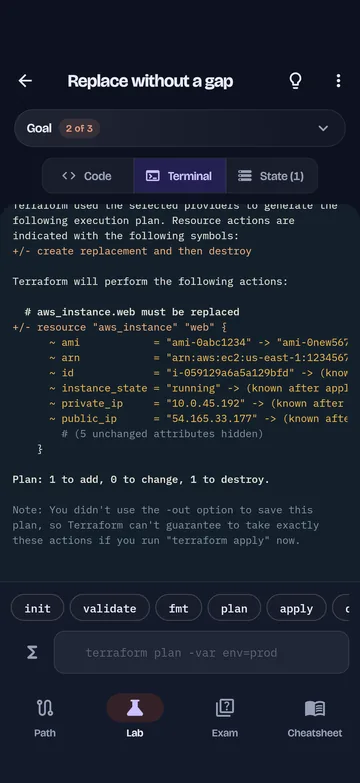
-/+). Withlifecycle { create_before_destroy = true }it creates the new one first (+/-), which avoids a gap. - Only what you name:
-replacetargets just that resource. Resources that reference it can still change as a result, because the new object has new values such as its ID; the plan shows those knock-on updates.
The terraform taint command
You'll still meet taint in older runbooks and exam questions about deprecated commands. The syntax:
$ terraform taint aws_instance.web
Resource instance aws_instance.web has been marked as tainted.
The next plan then shows:
  # aws_instance.web is tainted, so must be replaced
-/+ resource "aws_instance" "web" {
      ...
    }

Plan: 1 to add, 0 to change, 1 to destroy.
It takes the same address forms as -replace, plus -allow-missing (succeed even if the resource isn't in state) and the usual -lock and -lock-timeout options. The equivalent modern command is simply terraform apply -replace="aws_instance.web".
terraform untaint
terraform untaint removes the tainted mark, so the next plan no longer replaces the resource:
$ terraform untaint aws_instance.web
Resource instance aws_instance.web has been successfully untainted.
Unlike taint, untaint isn't deprecated, because there is no plan option that does the same thing. You need it mostly for resources Terraform tainted itself (next section) when you know the object is actually fine, for example after fixing it by hand.
When Terraform taints a resource automatically
Terraform marks a resource as tainted when it was created but not completed successfully. The two common cases:
- A creation-time provisioner failed. The object exists, but the
remote-execorlocal-execstep that was meant to set it up returned an error. Terraform can't know what state the object is in, so it marks it tainted and replaces it on the next apply. Settingon_failure = continueon the provisioner stops this. - Creation failed part-way. The provider created the object but reported an error before finishing, such as a timeout waiting for it to become ready.
Partial failures leave everything else as it was: resources that succeeded in that apply are saved in state normally. terraform show marks the tainted resource with (tainted). Your choices are to apply again (Terraform replaces it), or to untaint it if you've checked the object and it's usable.
Automatic replacement with replace_triggered_by
-replace is for one-off, manual replacements. If a resource should always be replaced when something else changes, declare it with replace_triggered_by (Terraform 1.2+) in the lifecycle block:
variable "release" {
  type    = string
  default = "v1"
}

resource "terraform_data" "release" {
  input = var.release
}

resource "aws_instance" "web" {
  ami           = "ami-0abc1234"
  instance_type = "t3.micro"

  lifecycle {
    replace_triggered_by = [terraform_data.release]
  }
}
Now terraform plan -var release=v2 replaces the server, because the terraform_data resource it references changes. replace_triggered_by takes references to managed resources or their attributes; terraform_data is the usual way to trigger on a plain value like a variable. Details in Terraform lifecycle rules.
taint vs -replace vs replace_triggered_by
terraform taint | apply -replace | replace_triggered_by | |
|---|---|---|---|
| Status | Deprecated since 0.15.2 | Recommended | Recommended (1.2+) |
| Changes state immediately | Yes | No, only on apply | No, only on apply |
| Shown in plan as | is tainted, so must be replaced | will be replaced, as requested | A replacement caused by the referenced change |
| Best for | Legacy scripts | One-off rebuilds | Rules that always apply |
| Undo before apply | terraform untaint | Don't apply | Remove it from config |
Try it in a Lab
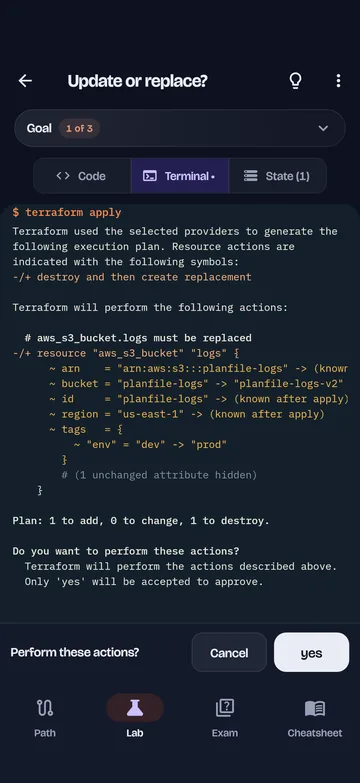
Planfile's Lab simulator supports terraform plan -replace, terraform apply -replace, taint and untaint, so you can compare the two plans side by side. The Lab Update or replace? shows a replacement the configuration forces (-/+ with # forces replacement), and Replace on each release sets up replace_triggered_by with terraform_data. All on a simulated cloud on your iPhone.
Questions
Is terraform taint deprecated?
Yes. Since Terraform 0.15.2, HashiCorp recommends terraform apply -replace=ADDRESS instead. taint still works but changes state before you have seen a plan.
How do I force Terraform to recreate a resource?
Run terraform apply -replace="aws_instance.web". The plan shows the resource will be replaced, as requested, and nothing happens until you approve.
What does terraform untaint do?
It removes the tainted mark from a resource in state, so the next plan no longer replaces it. Use it when Terraform tainted an object that you've checked is fine.
Why is my resource tainted?
Terraform taints a resource when creation didn't finish successfully, most often because a creation-time provisioner failed. The next apply replaces it unless you untaint it.
What is the difference between terraform taint and terraform replace?
taint edits state immediately and the replacement happens on a later apply; -replace is an option on plan and apply that proposes the replacement in a plan you approve, with no change to state before that.